


Table of Contents


Python is one of the most popular programming languages because it is easy to read and simple to write. Many beginners choose Python as their first language, and many professionals rely on it for their daily work.
However, writing Python code that only works is not enough. It should also be easy to read, fix, and evolve over time.
When code is messy, it becomes hard to understand even for the person who wrote it. This often leads to bugs, slow programs, and wasted time. Writing better Python code helps developers work faster and makes programs more reliable. This is why learning good work habits early is very important.
Whether you are building a small script, a website, or working with a team at a web design & development company, clean Python code makes everyone’s work easier. It improves the performance of the website and helps web development projects stay organized as they grow.
In this post, you will learn about the ideal practices in writing efficient, clean and maintainable Python code.
How These 9 Good Python Practices Turn Simple Code into Reliable Programs (Python Scripts)
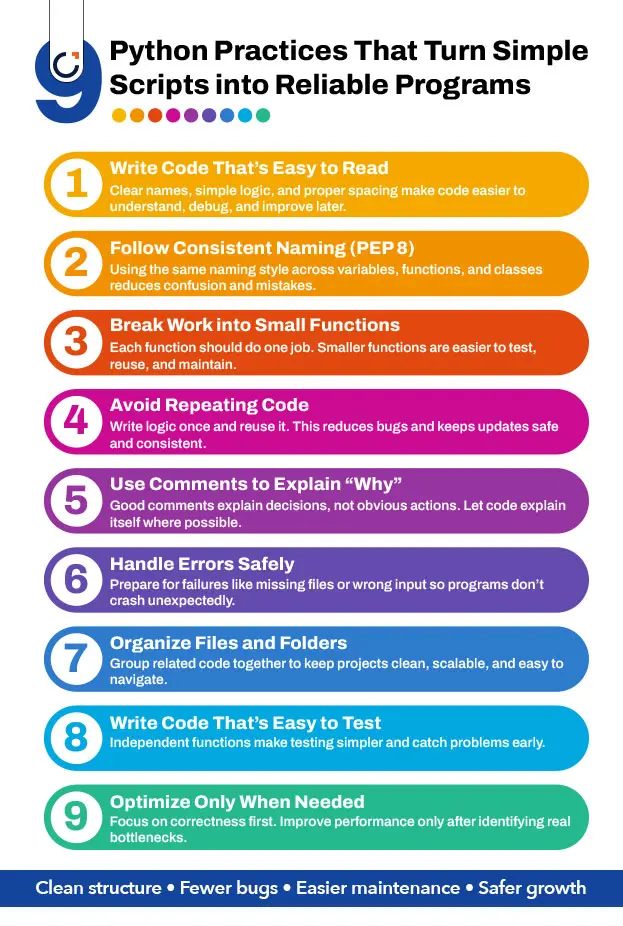
Writing better Python code starts by keeping functions short, files well organized, and naming consistent, so the program remains easy to understand before adding new code or complex logic (step-by-step rules that tell the program what to do and when to do it).
1. Write Code That Is Easy to Read Before Making It Fast
Readable code means that a person can look at the program and clearly understand what each part is doing without guessing the purpose of a variable, function, or step. In Python, this means writing code so someone can easily see what data is being used, what calculations are happening, and what result the program is trying to produce.
For example, using a variable name like ‘total_price’ clearly shows that the value stores the final cost of something, while a short name like ‘tp’ forces the reader to guess its meaning. In the same way, proper spacing, clear line breaks, and simple step-by-step logic help readers understand how the program moves from one action to the next without losing track.
When code is confusing, problems such as wrong calculations, skipped steps, or incorrect conditions become harder to notice. A computer will still run confusing code, but a human will struggle to see where the logic went wrong when something breaks.
Writing readable code also helps beginners avoid common mistakes, such as using the wrong variable, placing code in the wrong order, or combining multiple tasks in one place. Once the program flow and calculations are easy to understand, you can later improve execution speed by adjusting loops, data handling, or repeated operations if the program runs slow.
This is why organizing functions clearly, keeping each task separate, and writing step-by-step logic should come before trying to make the program faster or shorter.
2. Follow a Consistent Naming Style Throughout Your Code (PEP 8 Guidelines)
Using a consistent naming style means naming variables, functions, and classes in the same clear pattern so their purpose is easy to understand at first glance. In Python, this usually means writing variable and function names in lowercase with underscores, such as ‘calculate_total’, and writing class names with capital letters, such as ‘UserAccount’.
This naming style helps readers quickly understand what each name represents. For example, when someone sees a lowercase name with underscores, they can tell it is a function or variable that performs an action or stores a value. When they see a capitalized name, they know it represents a class that groups related data and behaviour. This removes guesswork and makes it easier to follow how the program works.
When different naming styles are mixed, readers must pause to figure out whether something is a function, class, or variable. This slows down reading and increases the chance of using the wrong name while making changes.
Consistent naming also helps code editors detect mistakes, suggest correct names, and reduce errors during updates, making the code safer to maintain.
3. Break Big Tasks into Small Functions
Breaking big tasks into smaller functions means dividing a program into short sections where each function handles only one type of work. Large blocks of code are difficult to read because many actions are mixed. When something goes wrong, it becomes hard to tell which step caused the problem and fixing it takes more time.
For example, a single long function that reads user input, performs calculations, and displays results forces the reader to understand everything at once. Splitting this into separate functions allows one function to handle input, another to process data, and another to show results. Each function then focuses on one responsibility, making the program easier to understand and manage.
Smaller functions are also easier to test. You can check whether each function works correctly without running the entire program. Reusing code becomes simpler as well, because a function that performs one task can be used in different parts of the program.
This approach supports clean Python code practices by limiting the impact of changes. When updates are needed, only the related function is modified, reducing the risk of breaking other parts of the program.
4. Avoid Repeating the Same Code Again and Again
Repeating the same code in multiple places may feel like a quick solution, but it creates problems when the program needs changes. When the same calculation or rule appears in many parts of a program, fixing an error means searching for every copy of that code. If even one copy is missed, the program may behave differently in different situations, which makes bugs harder to track.
Writing the code once and reusing it through a function avoids this issue. A function stores the logic in one place and allows the program to use it wherever needed. When a change is required, updating the function automatically updates every place where it is used. This saves time and reduces the chance of mistakes.
Avoiding repetition also improves readability. Instead of scrolling through repeated blocks of similar code, readers can focus on the main flow of the program and understand what it is doing step by step. Shorter code with reused logic is easier to review, easier to test, and safer to update as the program grows.
5. Use Comments Carefully to Explain Why, Not What
Comments should be used to explain reasons behind a decision, not to restate what the code is already doing. When a comment only repeats the action written in the code, it adds no value. For example, writing a comment like “add 1 to the value” does not help because anyone reading the line can already see that action.
Useful comments explain why a certain approach was chosen. A comment might describe why a specific number is used, why a particular step must happen before another, or why an easier-looking option was avoided. This kind of explanation helps someone understand the reasoning behind the code, especially if they did not write it themselves.
Comments are also helpful when the code follows a rule or limitation that is not obvious, such as handling a special case or avoiding a past error. However, adding too many comments can make a file harder to read, especially if the comments explain simple actions.
The goal is to write code that explains itself through names and structure. Use comments only where extra explanation is truly needed.
6. Handle Errors in a Safe and Predictable Way
Handling errors in a safe and predictable way means preparing your program for situations where something goes wrong. No program runs perfectly all the time. Files may be missing, users may enter wrong data, or values may fall outside the expected range. When these situations are ignored, the program can suddenly stop, which creates frustration and makes problems harder to understand.
Good Python code checks for possible failures and responds in a controlled manner. For example, when a program tries to read a file that may not exist or is unreadable, instead of crashing, it should detect this situation and display a helpful message that explains what happened.
This approach protects the program from unexpected stops and makes its behaviour more predictable. It also helps during testing and future changes, because problems are reported where and when they occur. Proper handling helps developers find causes faster and fix issues safely.
7. Keep Files and Folders Well Organized
Keeping files and folders well organized means placing related Python files into separate folders based on what they do. When all files are stored in one location, it becomes difficult to understand which file controls which part of the program. As projects grow, this confusion increases and mistakes become more common.
Organizing files by purpose helps prevent this problem. For example, files that handle data input can be placed in one folder, files that perform calculations in another, and files responsible for output in a separate location. This arrangement helps developers quickly find the file they need without searching through unrelated code.
Good organization also reduces accidental changes to the wrong file. When each folder has a defined role, updates become safer and faster. In team environments, especially in a web design & development company, organized folders allow multiple people to work at the same time without overwriting each other’s work or causing conflicts.
8. Write Code That Is Easy to Test
Writing code that is easy to test means designing your program so each part can be checked on its own. Testing is how you make sure your program behaves as expected. If functions are short, focused, and independent, you can test one without running the entire program. This makes finding mistakes faster and simpler.
When code is tangled or too long, problems can remain hidden for a long time, leading to unexpected behaviour. By structuring functions to work separately, bugs are detected early and fixing them doesn’t break other parts of the program.
Test-friendly code also encourages better programming habits. It forces each function to do one job and limits hidden connections between parts of the program. This reduces errors and makes future updates safer, helping the overall program stay reliable over time.
9. Improve Performance Only When It Is Really Needed
Improving a code’s performance only when necessary means focusing on making your program work correctly first, rather than trying to make it fast right away. Many beginners try to optimize every part of the code immediately, which can lead to tangled functions, overly complex loops, or confusing shortcuts that are hard to read. These shortcuts often make it harder to understand and maintain the program later.
The best approach is to write code that works and is easy to follow. Once the program is complete, you can measure which parts are slow or cause delays. Then, improve only those specific sections, such as optimizing a loop or reducing repeated calculations.
This strategy keeps the program simple and easier to maintain. It also reduces the chance of introducing new mistakes while trying to make it faster. By balancing speed and simplicity, the program remains reliable, understandable, and easier to update.
How Organized Code Makes Updates Easier
Good structure is not just about today’s code. It prepares your program to grow, change, and stay useful.
1. Keep Logic and Output Separate
Separating the logic of your program from the parts that show results or interact with users makes updates much easier. Logic includes all the calculations, rules, and decisions your program makes. Output includes messages, printed results, or displayed information. When these are mixed, even small changes to the output can accidentally break the calculations or other rules.
For example, if a program calculates totals and immediately prints them, changing the output format might cause errors in the calculations. If calculations are in one function and output is in another, you can safely change the way results are shown without touching the program’s rules.
This separation also makes testing simpler. You can check if the logic produces correct results without worrying about the output, and you can change the output format without retesting calculations. By keeping these parts separate, updates become faster, safer, and less stressful, especially in larger projects.
2. Organize Files by Purpose
Organizing program files into folders based on their function helps when the program grows or multiple people work on it. For instance, one folder can hold files that handle data input, another can contain files for calculations, and a third can store output or reports. This way, anyone reading the project knows exactly where to find the code they need to update.
Without organization, changing something often requires searching through unrelated files, which increases the chance of mistakes. With a structured setup, updates are safer because only the relevant files are changed. This also improves teamwork.
In a web design & development company or any team website development project, several Python developers can work on different parts without overwriting each other’s changes. Organized files make future updates more predictable, reduce errors, and save time.
How Python Code Stays Reliable When New Features Are Added
Here’s how Python code stays reliable when new features are added.
1. Add New Features Through Separate Functions Instead of Editing Old Ones
When a new feature is added by changing existing functions, it can unintentionally change results that users already depend on. This happens because older logic and new logic become mixed, making program behaviour harder to predict. Even small edits can alter calculations, output order, or data handling.
A safer approach is to write new functions that work alongside existing ones. The old code continues to run exactly as before, while the new feature uses its output or passes data into it. This keeps earlier program behaviour stable while allowing the program to grow.
This method also makes problems easier to trace. If something fails, the issue is more likely inside the new function rather than spread across the entire program.
2. Limit How Much Existing Code New Features Are Allowed to Touch
New features often need data from older parts of the program. Problems arise when a new feature directly changes shared variables, files, or settings used elsewhere. These hidden connections can cause errors in areas that seem unrelated.
To prevent this, new features should interact with existing code through defined inputs and returned values. Instead of changing shared data directly, the new feature should request what it needs and return results without altering the original behaviour.
This boundary keeps older parts of the program predictable. As more features are added, this separation reduces unexpected side effects and helps the program remain reliable even as it grows.
Writing better Python code is about clarity, care, and consistency. When code is easy to read and well-structured, it becomes easier to fix, test, and grow. These habits help beginners build confidence and help teams work better together. Whether you are learning alone or working at a web design & development company, following clean Python code practices makes your programs stronger and more reliable in the long run.
Frequently Asked Questions
1. What does clean Python code mean?
2. What are Pythonic Constructs and Libraries?
3. Why should the PEP 8 Guidelines be maintained?
4. Why a Developer’s Toolkit Matters for Maintaining Code Quality?
Request a
Free Quote Today!


