


Table of Contents


Most people have encountered a chat window that appears on a website, asking if they need help. That small window is powered by artificial intelligence. There is no person sitting behind a screen waiting to respond. It is a software program that reads the message, understands what the visitor is asking, and replies within seconds.
Businesses today are using AI chatbots for far more than answering basic questions. They are booking appointments, qualifying sales leads, processing returns, and helping human employees retrieve internal information faster than ever before.
This guide covers everything a business needs to know about AI chatbots—from what they are and how they work to how they are built, deployed, and measured.
Whether a company is exploring chatbots for the first time or looking to scale an existing chatbot solution, this guide provides a complete picture of what the journey looks like from start to finish.
What Is an AI Chatbot & Why Do Businesses Need Them?
An AI chatbot is a software program that communicates with people—through text or voice—and uses artificial intelligence to understand what is being said and respond in a meaningful, relevant way.
AI chatbots use a technology called Natural Language Processing, commonly referred to as NLP. NLP is what allows the chatbot to read text the way a person would. It breaks down a sentence, identifies what the user is asking for, and matches that intent to the right response or action.
On top of NLP, most modern chatbots also incorporate machine learning. This means the chatbot improves over time. The more conversations it handles, the better it becomes at recognizing different ways people phrase the same question and responding accurately to each variation.
Why Businesses Are Investing in This Technology
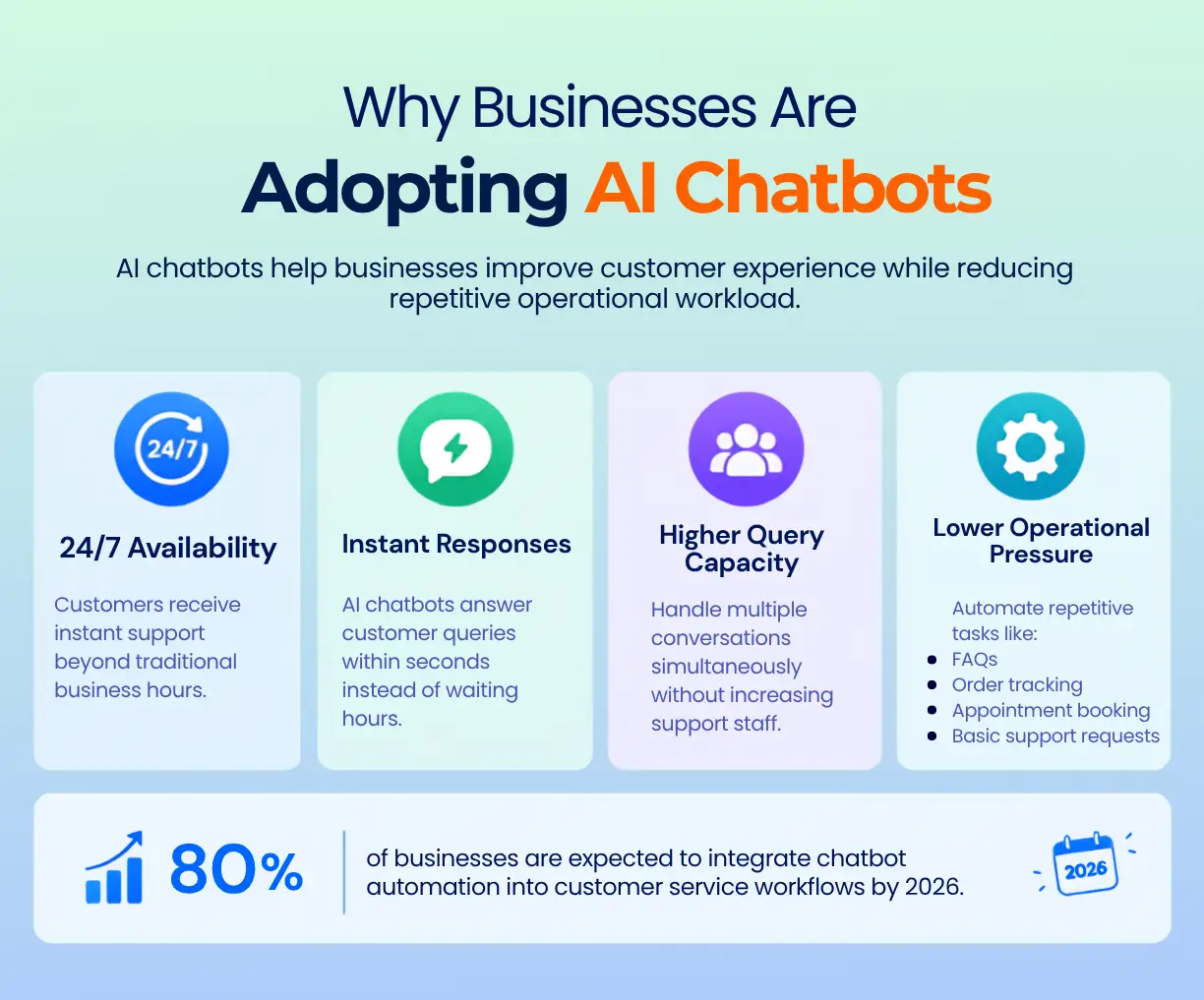
A human support agent handles one conversation at a time. On the other hand, a chatbot handles hundreds simultaneously. A human works during business hours while a chatbot operates around the clock, every single day, without additional staffing costs involved.
Businesses face growing pressure to respond faster to customers, spend less on operational costs, and still maintain a quality customer experience. A well-built chatbot addresses all three of those pressures at once, which is why companies of varying sizes are actively exploring AI chatbot development services as a core business tool rather than an optional add-on.
Advantages & Benefits of Chatbots for Business
The business value of chatbots is consistent across industries. Each advantage below reflects a real, documented outcome that organizations have reported after deploying chatbot solutions.
1. Around-the-Clock Availability
Human support teams work in shifts; chatbots do not. A customer in a different time zone who visits a website at midnight receives the same quality of service as someone visiting during peak business hours. This matters significantly for businesses with international customers or those operating in markets where after-hours queries are common.
2. Handling Large Query Volumes Without Expanding Staff
Seasonal spikes during holiday sales, major product launches, or service outages can overwhelm even a well-staffed support team. A chatbot absorbs that additional volume without the business needing to recruit and train temporary staff. It scales up during busy periods and scales back automatically when demand settles.
3. Faster Response Times
Waiting hours for a reply to a support email is a frustrating experience for most customers. But a chatbot responds within seconds of receiving a message. That difference in speed affects how satisfied customers feel with a brand, sometimes even before their actual issue has been resolved. Speed is one of the strongest drivers of positive customer experience in digital interactions.
4. Reduced Operational Costs
When a chatbot handles repetitive, routine queries like order tracking, account balance inquiries, and appointment confirmations, human agents are freed up for work that genuinely requires their attention. A business can manage a higher overall volume of interactions without proportionally growing the team. The cost reduction that comes from this shift is one of the most frequently cited reasons why organizations invest in chatbot technology.
5. Lead Generation and Sales Support
Chatbots are not limited to answering questions; they ask questions too. A bot placed on a pricing page might ask a visitor what they are looking for, how large their team is, and what their timeline looks like. That information represents a qualified lead, which is gathered automatically before any sales representative needs to get involved.
6. Consistency in Communication
A human agent might interpret a policy slightly differently from one interaction to the next. A chatbot delivers the same message every time, regardless of how busy the day is or how many conversations it has already handled. For businesses where accuracy and brand voice are priorities, that level of consistency has genuine value.
How to Make a Chatbot: Step-by-Step Guide
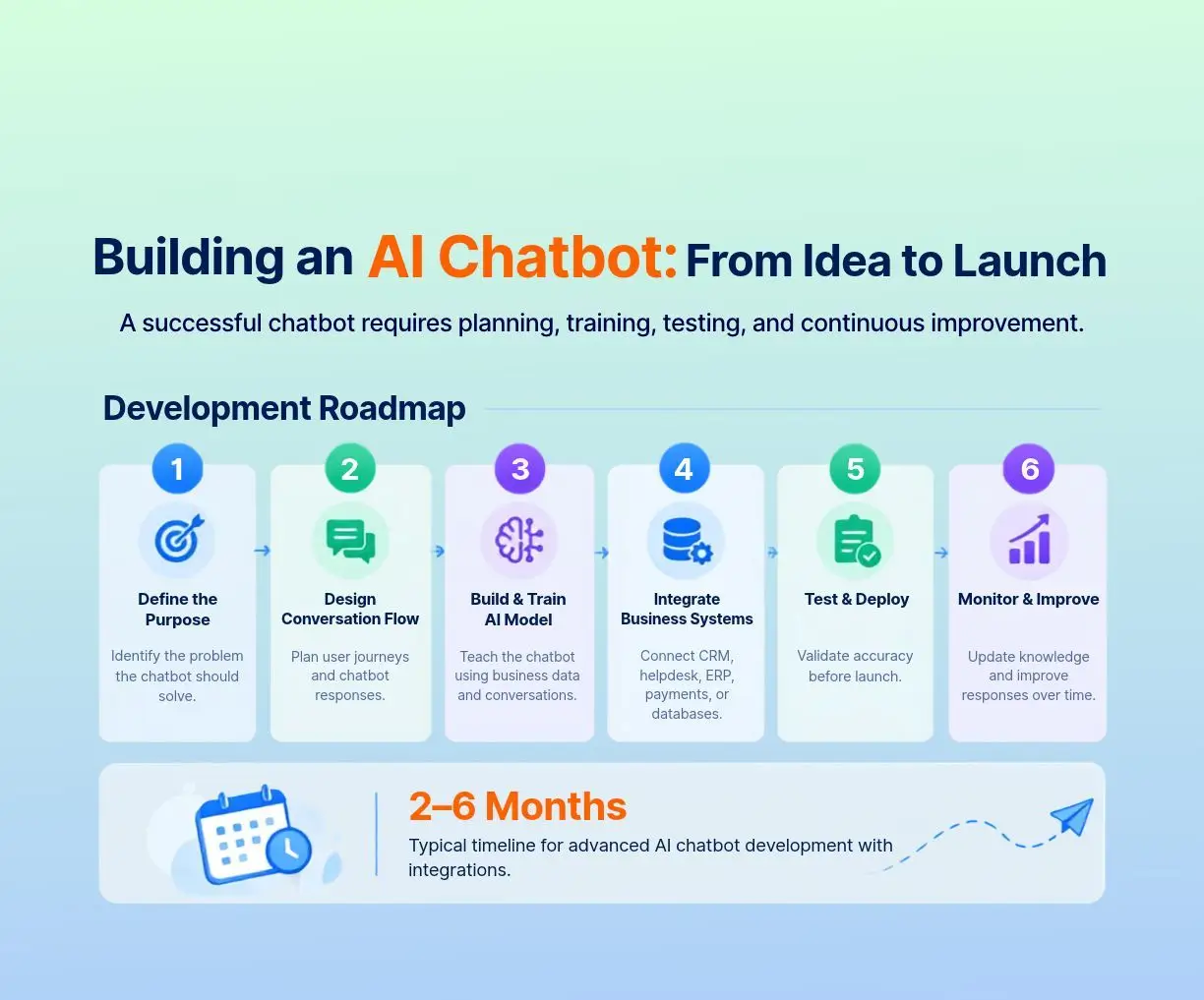
Building a chatbot might appear to be a highly technical undertaking. When broken down into clear stages, however, the process becomes far more approachable. The steps below apply whether a business is building an internal helpdesk bot or a customer-facing sales assistant.
Step 1: Define What the Chatbot Will Do
Before any platform is selected or any code is written, the business needs to answer one question clearly: what specific problem is this chatbot solving?
The more specific the answer, the better the chatbot will perform. A bot built to handle product return requests delivers far better results than one built to "help customers with everything." Broad goals lead to unfocused bots that do nothing particularly well.
Strong starting points for a first chatbot include:
- Answering the most frequently asked customer questions.
- Handling appointment bookings or scheduling requests.
- Qualifying incoming leads before routing them to a sales team.
- Providing real-time order tracking updates.
Step 2: Select a Platform or Development Approach
Two main paths exist here. The first is using a chatbot platform, a tool where conversation flows are designed visually, often without heavy coding requirements. Examples include Dialogflow from Google, Microsoft Bot Framework, and various third-party chatbot builders. These platforms are faster to set up and work well for common business use cases.
The second path is custom development. A chatbot development team builds the chatbot from the ground up, using programming languages and AI frameworks to create exactly what the business requires. This approach takes longer and typically costs more upfront, but it gives the organization full control over how the bot behaves, what it connects to, and how it is structured.
Businesses with unique internal processes or specific integration needs often turn to custom chatbot development services because off-the-shelf platforms simply cannot accommodate the level of specificity they require.
Step 3: Design the Conversation Flow
A conversation flow is a map of how a conversation moves from the user's first message to a resolution. Designing this map involves thinking through:
- What the bot says when a conversation begins.
- How it handles different types of questions and requests.
- What it does when it does not understand something the user has said.
- When and how it transfers a conversation to a human agent.
Good conversation design requires thinking from the user's perspective. That includes anticipating the many different ways someone might phrase the same question and planning for conversations that go in unexpected directions.
Step 4: Build and Train the Bot
Once the platform is selected and the conversation flow is designed, the actual building begins. For AI-powered bots, training is a central part of this stage.
Training means feeding the bot examples of real conversations—the kinds of questions customers actually ask, the correct responses to those questions, and different variations in how questions are phrased. The bot uses this data to recognize patterns. A well-trained bot understands that "where is my order," "I have not received my package," and "when will my delivery arrive" are all asking the same thing and responds correctly to all three.
Step 5: Test Thoroughly Before Launch
Testing is not a step that can be skipped or rushed. A bot that fails during internal testing will fail in a far more public way when real customers encounter it.
Thorough testing should include:
- Manually running through every conversation flow from start to finish.
- Testing a wide variety of phrasing to verify that the bot recognizes intent correctly.
- Checking how the bot handles situations where it does not understand what has been asked.
- Verifying that all connections to external systems—such as a CRM or order management platform—are working accurately.
Step 6: Launch, Monitor, and Keep Improving
Launching the chatbot is not the end of the process. Conversation logs should be reviewed regularly after launch. If many users are asking a question the bot consistently fails to answer well, that is a clear signal to improve the training data or build a new conversation flow.
Chatbots that are left without any attention after launch gradually become less useful as the business around them changes.
How to Make a Chatbot for a Website
Placing a chatbot on a business website is one of the most practical and immediate ways to start using this technology. Here is how the process typically works.
Choosing Between a Widget and a Native Integration
A chat widget is a small pop-up or icon that appears in the corner of a webpage. When a visitor clicks it, a chat window opens. This is the most common form of website chatbot. It is quick to set up and compatible with almost any website platform.
A native integration means the chatbot is built directly into the structure of a specific page—not as a separate floating element, but as part of the page itself. This might mean a chatbot appearing inside a product listing page, a booking form, or a support portal. The experience feels more connected with the user’s intentions, though it requires considerably more development work to implement properly.
The Technical Setup, Explained Simply
- The chatbot platform or development team provides a small piece of code — known as a JavaScript snippet.
- This snippet is placed into the website's source code, typically near the bottom of each page.
- The chatbot platform then handles everything underneath, including the conversation logic, the AI processing, and the delivery of responses to the user.
- Any connections to other business systems—such as a customer database, helpdesk software, or inventory platform—are configured through the platform's settings or via an API connection.
For businesses without in-house technical staff, professional AI chatbot development services cover this entire setup process. This process ranges from designing the conversation flows to deploying the bot on the live website and configuring all the triggers and integrations that make it work effectively.
Getting More From a Website Chatbot
A website chatbot can be far more proactive than simply sitting in the corner waiting for a visitor to click on it. With thoughtful configuration:
- The bot can appear automatically after a visitor has spent a defined amount of time on a high-intent page, such as a pricing or contact page.
- Different pages can have different opening messages. For instance, a product page bot might offer to help compare options, while a checkout page bot might answer questions about delivery.
- The bot can recognize returning visitors and adjust its greeting accordingly, rather than treating every visit as if it were the first.
These configurations require deliberate planning, but they make a meaningful difference to how much practical value the chatbot delivers for the business.
Understanding Enterprise Chatbot Integration & System Connectivity
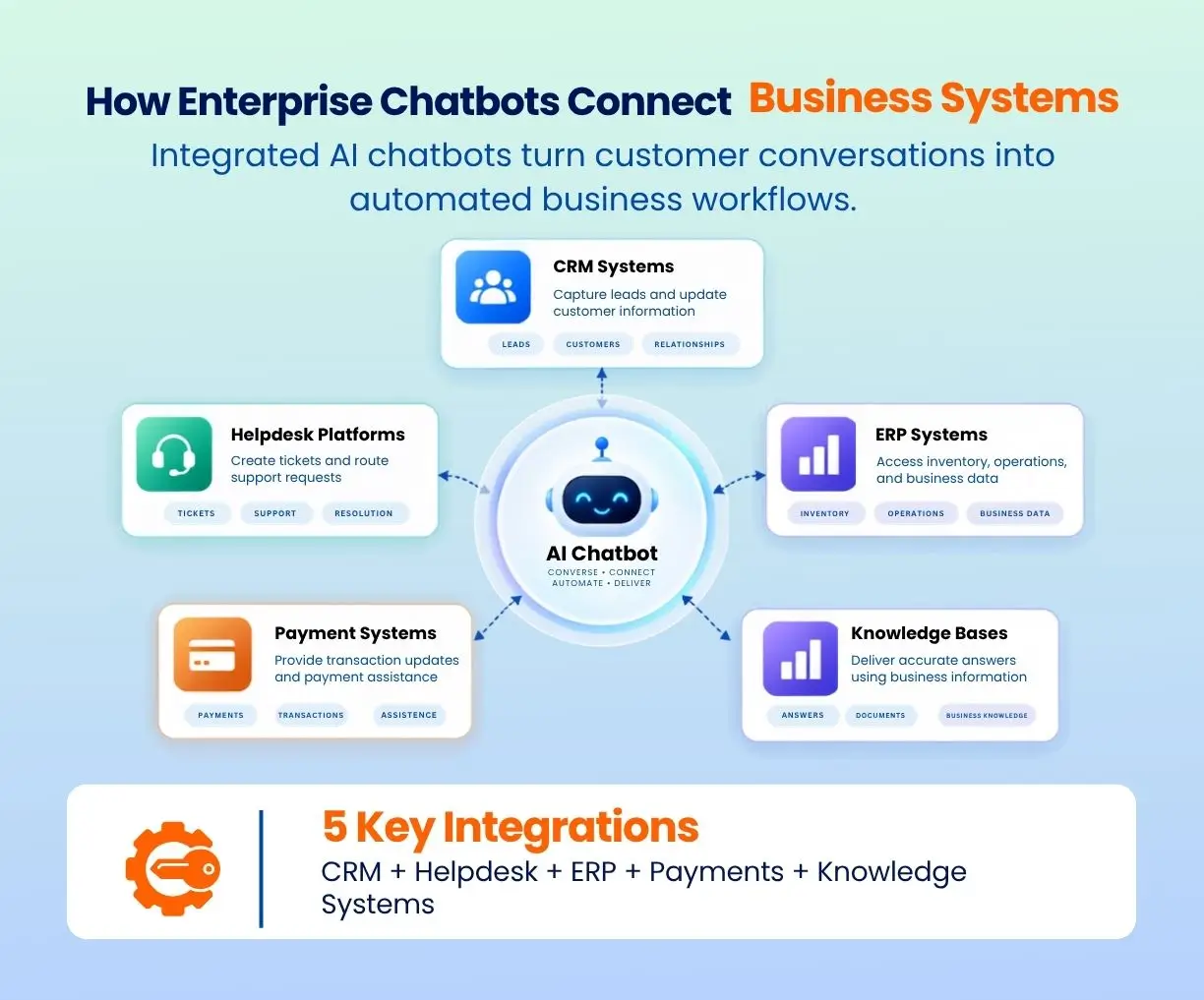
For larger organizations, a chatbot that only answers questions from a fixed knowledge base is not enough. Enterprise chatbots need to connect with the systems the business already relies on, pulling and updating real data in real time.
What System Integration Actually Means
When a customer asks a chatbot, "What is the status of my order?" and the chatbot provides an accurate, up-to-date answer, that happens because the bot is connected to the company's order management system. It retrieved that specific customer's order data and presented it in a readable format within seconds.
That connection is what is called a system integration. Here are the most common integrations for business chatbots.
CRM Integration (e.g., Salesforce, HubSpot): The chatbot retrieves customer records, logs new interactions, and updates contact information without any manual involvement from staff. Sales teams benefit because the bot gathers useful prospect information before handing off to a human representative.
Helpdesk Integration (e.g., Zendesk, Freshdesk): When the chatbot cannot resolve an issue, it automatically creates a support ticket in the helpdesk system and routes it to the right team. The customer receives a reference number. The support team receives a pre-filled case with the full conversation history already attached, saving time on both sides.
ERP Integration (e.g., SAP, Oracle): For businesses in manufacturing, logistics, or supply chain management, ERP integration allows the chatbot to pull inventory levels, production schedules, or procurement details on demand — without a staff member needing to look the information up manually.
Payment System Integration: A chatbot connected to a payment gateway can confirm whether a payment has been processed, provide invoice details, or flag a failed transaction. All of this is done in real time, without requiring human involvement in the conversation.
Data Security in Enterprise Chatbots
Enterprise chatbots interact with sensitive information daily, including customer account data, payment records, and other internal business documents. Responsible custom chatbot development services at this level build with security embedded at every layer. This includes:
- Encrypted connections between the chatbot and all integrated systems
- Role-based access controls that restrict what data different users can retrieve
- Regular security reviews to identify and close vulnerabilities before they create problems.
Chatbot Use Cases Across Industries
AI chatbots are addressing specific, practical problems across a broad range of industries. The examples below reflect how different sectors are putting this technology to meaningful use.
Healthcare
- Patients use chatbots to book appointments, receive automated reminders, and complete pre-visit intake forms without calling the clinic.
- Symptom-checking bots help users understand whether their symptoms are minor or whether they need to seek medical attention quickly.
- Post-visit bots send follow-up messages after appointments to check on patient recovery and gather feedback about the experience.
E-Commerce and Retail
- Product recommendation bots ask customers what they are looking for and suggest relevant items from the catalogue based on their responses.
- Order tracking bots handle delivery status queries without any human involvement. This is one of the highest-volume support request types in retail.
- Return and exchange bots guide customers through the return process step by step and initiate the return in the background at the same time.
Banking and Finance
- Account inquiry bots provide customers with their current balance, recent transaction history, and credit limit details in a secure, authenticated conversation.
- Fraud alert bots notify customers immediately when unusual activity is detected on their account and ask them to confirm or dispute the transaction.
- Loan pre-screening bots collect basic financial information from applicants and provide an initial eligibility assessment before routing qualified leads to a human advisor.
Education
- New student bots guide applicants through enrolment steps, required documentation, and application deadlines.
- Course selection bots ask students about their goals and career interests, then suggest relevant programmes from the institution's offerings.
- Administrative bots handle common queries about timetables, tuition fees, and campus policies. This reduces the volume of routine questions handled by administrative staff
Real Estate
- Property search bots ask buyers about their budget, preferred location, property size, and other requirements, then filter listings accordingly.
- Appointment bots allow potential buyers to schedule property viewings directly through the conversation, without calling the agency.
- Mortgage information bots help buyers understand what they might realistically afford based on the details they provide.
Each of these examples reflects a broader pattern: AI chatbot development services are being applied to real, sector-specific challenges rather than deployed as generic tools expected to solve everything at once.
Chatbot Best Practices & Implementation Strategy
A chatbot built without a clear strategy often frustrates users rather than helping them. The practices below separate chatbot implementations that perform well from those that quietly underdeliver.
Start with One Clear Purpose
One of the biggest blunders businesses make is creating a chatbot that tries to do too many things at once. When you build a bot that does the returns, books appointments, responds to product inquiries, takes payments, and answers HR questions all at the same time, this bot is unlikely to do any of those things well.
Instead, taking it slow and starting with one task, then executing it perfectly, is a much better idea. Once you achieve some degree of success with your bot for your chosen task, you can continue to grow its capabilities progressively.
Write in Plain, Conversational Language
The chatbot's responses should sound like a knowledgeable and approachable person, not a legal document. Short sentences. Simple words. Direct answers.
If the bot responds with "Please be advised that your request has been registered and will be processed in accordance with standard operational procedures," that is a failure of communication. A better response is: "The request has been submitted. Someone will be in touch within 24 hours." Clear. Simple. Useful.
Always Provide a Path to a Human Agent
No chatbot handles every situation perfectly. When the bot cannot help effectively, always give users a clear path to a real person, whether that's live chat, a phone number, or a message confirming when to expect a callback.
Businesses that remove this fallback in the name of cost efficiency often find that customer satisfaction drops. Users who feel stuck in an unproductive conversation with a bot quickly lose their patience, and their trust in the brand diminishes along with it.
Test With Real Users Before Going Live
Internal testing is valuable, but it rarely catches everything. Real users phrase questions in unexpected ways. They test edge cases without meaning to. Running a limited pilot with a small group of actual customers before a full launch typically surfaces issues internal teams missed. It also lets you resolve them before they reach a wider audience.
Choosing the Right AI Chatbot Development Partner
Selecting the right development partner is one of the most consequential decisions in the entire chatbot process. The wrong choice leads to bots that do not perform as expected, timelines that extend without explanation, and budgets that disappear without visible results. Here is what to look for.
Proven Experience in AI and Conversational Design
There is a meaningful difference between a team that has configured a few standard chatbot plugins and one that has genuine experience building AI-powered conversational systems. Asking for case studies, real project examples, and specific technologies the team has worked with helps establish whether the claimed experience is grounded in actual delivery.
Business Understanding Before Technical Recommendations
A strong development partner asks business questions before proposing technical solutions. They want to understand who the chatbot's users are, what problems the organization is genuinely trying to solve, and how success will be defined and measured. A vendor that jumps straight to platform recommendations without first understanding the business context is worth approaching with caution.
Structured Post-Launch Support
Creating the chatbot is only a part of the process. After the bot is launched, it is necessary to observe it, update and enhance it depending on the conversation data received in the course of chats. Reliable partners provide their clients with a clear support plan after the launch.
Transparent Pricing and Clear Timelines
The business needs to understand what they are paying for and when the results will be received. If the partner cannot give clear information about milestones of the project, the company should think again before working with this developer.
Things to Consider Before Making a Commitment
- What industries has the team developed chatbots for, and are there accessible case studies?
- Does the team create completely custom solutions or work mainly from existing platforms?
- How do they deal with changes to the project scope?
- What kind of post-launch support do they provide, and what are the associated costs?
- How does the team ensure data privacy and security?
Businesses that select a reputable provider of custom chatbot development services tend to avoid the most common implementation pitfalls — poorly defined project scope, weak integration with existing systems, and bots that degrade in quality because no structured maintenance plan was ever put into place.
AI chatbots have established a clear and growing role in modern business operations. When built with a defined purpose and integrated thoughtfully with existing systems, they deliver lower operational costs, faster customer responses, stronger satisfaction outcomes, and more efficient internal processes. The businesses seeing the strongest results are those that approached the process with clarity from the beginning. For any business considering this technology today, the groundwork is clear, the tools are available, and the business case is well-established. What matters most is building the right foundation from the very start.
Frequently Asked Questions
1. How long does it typically take to build and launch an AI chatbot?
2. What is the difference between a rule-based chatbot and an AI chatbot?
3. How much does it cost to develop a business chatbot?
4. Can a chatbot replace a human customer support team entirely?
5. How do businesses keep a chatbot accurate and useful over time?
Request a
Free Quote Today!


