


Table of Contents


Online retail depends on trust. A customer may compare prices, read product details, check delivery dates, and look for reviews before placing an order. But behind every purchase, there is one basic expectation from customers—that the store protect their personal details, payment information, login data, and order history.
That expectation has become harder to meet amid the growing risk of cybercrime. This is where OWASP compliance becomes important. OWASP, short for the Open Worldwide Application Security Project, provides widely used guidance on the most serious web application security risks.
For online retailers, OWASP compliance is not only a technical checklist but a practical way to reduce security gaps before they affect customers, revenue, and brand confidence.
Businesses investing in e-commerce website development services should look at security from the first planning stage, not after launch. A store that looks polished but has weak login controls, poor data protection, or unsafe checkout logic can still put the business at risk.
What Does OWASP Compliance Mean for E-Commerce Platforms?
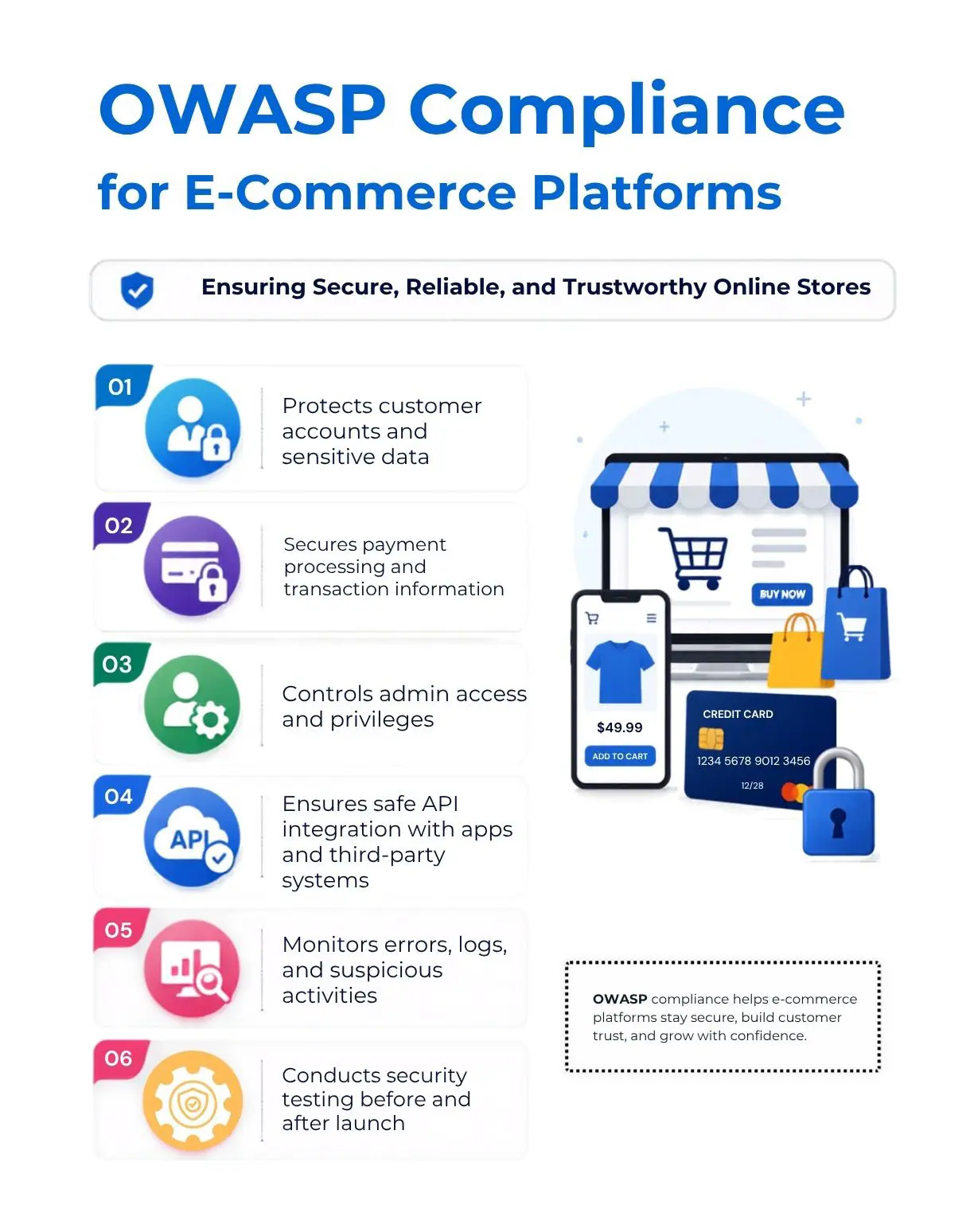
OWASP compliance means that an e-commerce platform is planned, developed, tested, and maintained with OWASP security guidance in mind.
It does not mean that OWASP gives a formal certificate to every website. Instead, it means the platform follows secure development practices that address known risks such as broken access control, injection attacks, weak authentication, outdated components, and security misconfigurations.
For an online retailer, OWASP compliance usually covers the following:
- How customer accounts are protected.
- How payment-related data is handled.
- How admin access is controlled.
- How APIs connect with apps, shipping tools, and third-party systems.
- How errors, logs, and suspicious activity are monitored.
- How security testing is performed before and after launch.
Many retailers focus on design, speed, and product presentation when selecting website design and development services. Those areas matter, but they should not be treated as separate from security. A secure store should be easy to use, quick to load, simple to manage, and difficult for attackers to misuse.
Why OWASP Compliance Matters the Most for Online Retailers
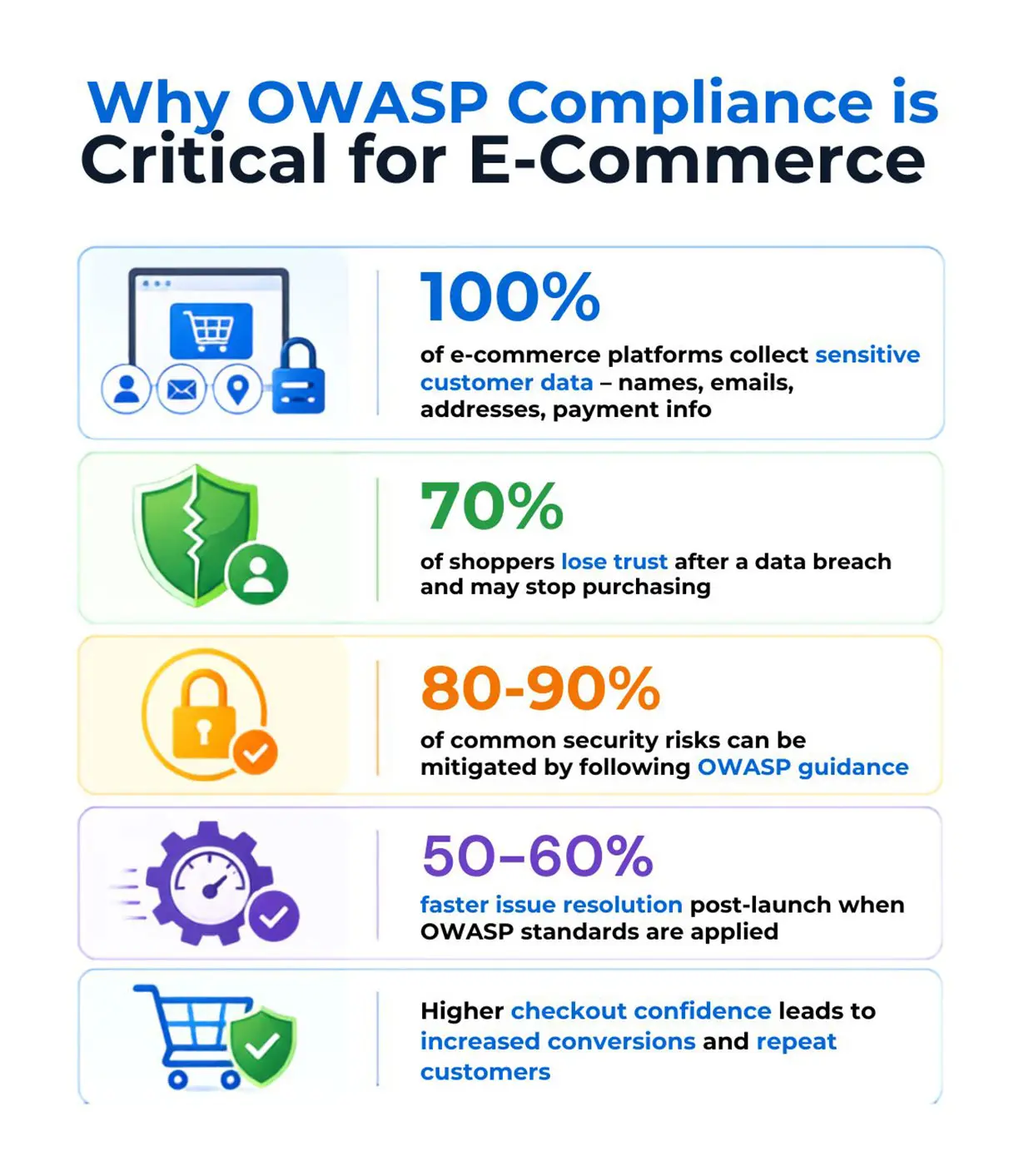
Ecommerce platforms frequently deal with confidential data. Therefore, even a single small store will collect a name, e-mail, phone number, shipping address, order details, password, coupon usage, refund record, and payment-related information. The consequences of data exposure go well beyond just one technical issue.
OWASP compliance matters because it helps retailers:
- Reduce common security risks before attackers find them.
- Protect customer accounts from unauthorized access.
- Lower the risk of checkout manipulation and payment fraud.
- Improve internal control over admin users and staff accounts.
- Support better security audits and compliance reviews.
- Build stronger customer confidence during checkout.t
- Reduce costly fixes after the platform goes live.
Business reputation can also be impacted by security. Customers may be forgiving if there is a problem with their order, such as a late shipment or an out-of-stock item, but if there is a data breach, customer trust can take a long time to rebuild. Many customers may stop purchasing from you and shop elsewhere if they feel their personal information is at risk.
For this reason, web design and development services should include security planning as part of their full project scope. Security should not be treated as an optional add-on after the store is built.
What Are the Top Security Vulnerabilities in E-commerce Platforms?
The most common e-commerce security vulnerabilities often come from poor access control, weak login protection, unsafe code, misconfigured systems, outdated plugins, and weak API security. These problems can affect hosted platforms, open-source stores, and custom-built systems.
1. Broken Access Control
Broken access control happens when a user can view or change information that they should not be able to access. In an e-commerce store, this may include viewing another customer’s order, changing account details without permission, accessing admin areas, or using hidden links to reach restricted pages.
2. Weak Authentication
Authentication enables a merchant to confirm that a user is actually the one claiming to be. This can include not having strong password rules, not enabling two-factor authentication, using insecure methods for resetting passwords, and weak session handling.
Weak authentication can also lead to account takeovers in e-commerce businesses. An attacker who successfully gains access to a customer's account will have access to saved addresses, loyalty points, order history, and credit card information. If the attacker is also given administrator access, the potential for damage can increase dramatically.
3. Injection Attacks
Injection attacks occur when harmful data is sent via forms, links to web pages, or other methods of entering information into a system. If the system doesn't properly validate the submitted information, an attacker could gain access to the database and read it, change it, or remove it.
Online stores are often at risk of injection attacks when they use product searches, contact forms, checkout fields, coupon boxes, or administrative areas for their daily operations. Hence, safe programming practices, input validation, and database security minimize the risk of an injection attack.
4. Security Misconfiguration
Security misconfiguration means that a system, server, plugin, cloud setting, or application feature is not set up safely. This may include exposed admin panels, default passwords, open storage folders, unnecessary services, or error messages that reveal internal details.
5. Vulnerable and Outdated Components
Many online shopping systems contain a range of components, such as themes, plugins, extensions, payment modules, analytics scripts, and third-party libraries. When these components become out of date or unsupported by their developer, online attackers can exploit any known vulnerabilities.
This issue is particularly critical for e-commerce stores running on open-source platforms. To help protect their sites, e-commerce employers must regularly update their platforms and plugins, use only well-documented plugins, and remove any tools or plugins that are not in use.
6. Payment Skimming
Payment skimming can occur when harmful code steals payment information from you at the time of checkout. This can be done using an infected script or a maliciously developed third-party tool or by compromising administrator access to your website.
Retailers should use trusted payment providers, keep checkout scripts under review, monitor changes to payment pages, and avoid storing card details unless there is a strong business and compliance reason.
How OWASP Supports Better E-Commerce Development
OWASP helps development teams focus on real risks instead of guessing what could go wrong. It gives a clear reference point for planning, coding, testing, and reviewing web applications.
In an e-commerce project, OWASP can support:
- Secure login and account design.
- Safer checkout flows.
- Stronger admin role management.
- Better API controls.
- Secure handling of customer data.
- Safer form processing.
- Stronger error handling and monitoring.
- Better testing before launch.
This matters because e-commerce security is not one task. It is a repeated process. Every new feature, plugin, integration, promotion engine, or mobile app connection can introduce risk.
A business choosing e-commerce website development services should ask how OWASP practices are included in the development process. The answer can reveal whether security is being treated seriously or only mentioned as a selling point.
How to Conduct a Security Audit of Your E-Commerce Platform
A security audit reviews how well an e-commerce platform protects customer data, admin access, checkout flows, APIs, integrations, and operational systems. The audit should not be limited to automated scanning. Automated tools are useful, but they can miss business logic issues, role-based access mistakes, and unsafe checkout behaviour.
Step 1: Map the Store’s Assets
The first step is to list what the store uses and where sensitive data flows. This includes the website, admin panel, payment gateway, customer database, hosting, plugins, themes, APIs, mobile apps, analytics tools, and support systems.
To give the audit a clear scope, the team should identify:
- Where customer data is collected.
- Where order data is stored.
- Which systems connect to payment services
- Which users have admin access.
- Which third-party scripts run on checkout pages.
- Which plugins or extensions are active.
- Which APIs are public or private.
Step 2: Review User Roles and Access
The audit should check whether each user has the right level of access, with admin rights limited to people who need them. That means that staff accounts should not share passwords, and former employees, old vendors, and unused accounts should be removed.
Important checks include:
- Admin account review.
- Two-factor authentication.
- Password policy.
- Login attempt limits.
- Role permissions.
- Password reset process.
- Staff access logs.
Access control is one of the most important areas in e-commerce security because a single weak admin account can expose the entire store.
Step 3: Test Forms, Search, and Checkout Inputs
It’s essential to evaluate all input fields, including login forms, contact forms, coupon fields, address fields, review page fields, and all checkout fields.
An input review assesses whether input fields can accept unsafe input or expose the system's internal workings. Proper input checks are a way to help prevent injection attacks, cross-site scripting, and data handling issues.
Step 4: Review APIs and Third-Party Integrations
APIs should be tested for proper authentication, access rules, rate limits, and data exposure. On that note:
- A customer API should not reveal admin data.
- A shipping API should not expose full customer records without need.
- A discount API should not allow unauthorized price changes.
Third-party integrations should also be reviewed. Retailers should know which tools are connected, what data they access, and whether they are still needed.
Step 5: Check Plugins, Themes, and Components
Outdated themes, plug-ins, libraries, and add-ons should be identified through the audit process. Any tools that are no longer being developed or maintained should be removed or replaced. Active plug-ins but unused present risks, which are critical for those running e-commerce sites using either open-source platforms or custom-built solutions with dependencies, e.g., extensions.
Step 6: Review Payment and Checkout Security
Payment security should be handled carefully - retailers should avoid storing card details unless required and properly protected. Also, payment gateways, checkout redirects, scripts, and transaction logs should be reviewed.
The audit should also check whether payment-related pages are protected from unauthorized script changes.
Step 7: Check Logs, Alerts, and Backup Plans
A store should be able to detect suspicious activity. Logs should record important actions such as admin login, failed login attempts, product price changes, refund activity, order exports, and plugin changes.
Backups should also be tested. A backup that cannot be restored is not useful during an incident.
Step 8: Document Findings and Fixes
There will be a definitive ending in an audit report that clearly explains each issue in layman's terms and identifies which team will be responsible. After fixes have been applied, it is necessary to retest before verifying that the identified issue has been rectified.
When retailers engage web design and development service providers, they should request audit-ready written documentation and not just verbal communication. Having a written record also provides a guide for future reviews, for discussions with vendors, and for accountability internally.
Which E-commerce Platforms Are Most Secure: Shopify, WooCommerce, or Custom Builds?
There is no single most secure e-commerce platform for every business. Shopify, WooCommerce, and custom builds can all be secure when managed properly. They can also become risky when settings, plugins, access controls, updates, or custom code are handled poorly.
Shopify Security
Shopify is a hosted platform, which means they handle many infrastructure and platform-level security responsibilities. This can be useful for retailers that want a managed environment with less technical maintenance.
Shopify is often a strong option for:
- Small and mid-sized retailers.
- Brands that need a reliable hosted checkout.
- Teams without large internal development resources.
- Stores with standard product, cart, and payment needs.
Shopify store owners must still manage all aspects of their stores, including app permissions, staff access, theme changes, third-party scripts, customer data handling, and store settings. A hosted platform reduces a few technical burdens. However, the Shopify store owner will still have many of the same security responsibilities as they did before using a hosted platform.
WooCommerce Security
WooCommerce gives retailers more control because it runs on WordPress. This flexibility can be useful for stores that need custom content, plugins, and business-specific features.
WooCommerce may work well for:
- Content-heavy online stores.
- Businesses already using WordPress.
- Retailers that need flexible plugin options.
- Teams with proper maintenance support.
The main security concern is that WooCommerce depends heavily on updates, hosting quality, plugin selection, theme quality, and admin practices. A poorly maintained WooCommerce store can become vulnerable quickly.
Custom E-Commerce Builds
Custom builds give the highest level of control. They can be designed around specific workflows, pricing models, user roles, integrations, and performance needs.
Custom builds may be suitable for:
- Enterprise retailers.
- Marketplaces.
- B2B commerce platforms.
- Subscription-based stores.
- Complex pricing or inventory systems.
- Businesses with unique checkout logic.
However, custom builds need strong planning, secure coding, testing, monitoring, and long-term maintenance. A custom store is not automatically safer. It is only safer when the development team follows strong security practices from the beginning.
Businesses considering e-commerce website development services for a custom platform should ask how the team handles OWASP Top 10 risks, API security, payment data, access control, and post-launch monitoring.
OWASP Compliance and PCI DSS: How Are They Connected?
OWASP and PCI DSS, short for Payment Card Industry Data Security Standard, are different, but they often work together in e-commerce security.
OWASP focuses on web application security risks. It helps teams understand and reduce weaknesses in application logic, code, access control, APIs, and configuration.
PCI DSSfocuses on protecting payment card data. It applies to businesses that store, process, transmit, or can affect the security of cardholder data.
For an online retailer, both matter. A store may use a PCI-compliant payment provider, but the website itself can still have unsafe admin accounts, risky plugins, exposed APIs, or harmful scripts. OWASP helps reduce those application-level risks.
A mature security plan should consider both:
- OWASP for secure application design and testing.
- PCI DSS for payment data protection.
- Strong access control for staff and vendors.
- Secure hosting and server settings.
- Regular updates and patching.
- Monitoring and incident response planning.
This combination gives online retailers a stronger foundation for long-term security.
Practical OWASP Security Checklist for Online Retailers
Retailers do not need to wait for a major incident before improving their website’s security. The following checklist can help them review key areas.
Account and Login Security
- Use two-factor authentication for admin users.
- Remove all inactive staff and vendor accounts.
- Avoid shared admin accounts.
- Review password reset flows.
- Limit repeated failed login attempts.
- Track admin login activity.
Access Control
- Give users only the access they actually need.
- Review roles for customer support, warehouse staff, marketing teams, and vendors.
- Block direct access to restricted pages.
- Test whether users can view another customer’s data.
- Review permissions after every major feature update.
Checkout and Payment Security
- Use trusted payment gateways.
- Avoid storing full card details on the store server.
- Review checkout scripts regularly.
- Monitor unexpected changes to payment pages.
- Keep payment plugins updated.
- Limit access to refund and transaction controls.
Plugin and Theme Security
- Use trusted plugin and theme sources.
- Remove unused plugins.
- Update themes, plugins, and platform files.
- Avoid pirated or unsupported extensions.
- Review plugins that access customer or payment data.
API Security
- Require authentication for private APIs.
- Limit what each API can access.
- Add rate limits to reduce abuse.
- Review API error messages.
- Track unusual API activity.
- Remove old or unused API keys.
Monitoring and Recovery
- Log important admin actions.
- Set alerts for suspicious activity.
- Test backups on a schedule.
- Prepare an incident response plan.
- Keep vendor contact details ready.
- Retest after fixing security issues.
How Secure E-Commerce Website Development Improves Business Growth
Security often sounds like a defensive task, but it can also support growth. A secure e-commerce platform gives teams the confidence to launch campaigns, add new features, connect new systems, and serve more customers without creating unnecessary risk.
For instance, an online merchant expecting to run a holiday sale will anticipate an increased site traffic, more login attempts, more coupon use, and greater activity at checkout. If the platform has poor access controls, insufficient logging capabilities, or insecure plug-ins, periods of high activity could expose it to risk due to the higher volume. On the other hand, a more secure platform will allow the merchant greater control during these periods of increased demand.
Security can also enhance relationships with key partners such as payment processors, enterprise customers, marketplaces, and business-to-business customers. Each is likely to inquire about security standards before entering into a business arrangement with an online merchant. Using OWASP-based development practices allows an online merchant to instill confidence in potential partners in their security practices, significantly increasing the likelihood of securing those future partnerships.
This is why website design and development services should not focus only on layout, product pages, and mobile responsiveness. A strong e-commerce project should also include secure architecture, safe coding, role planning, testing, and maintenance.
Common Mistakes Retailers Make With E-Commerce Security
Many security issues come from everyday decisions rather than advanced attacks. Retailers often make avoidable mistakes that create long-term risk.
Common mistakes include:
Launching the store before security testing.
Using too many plugins without review.
Giving admin access to too many people.
Keeping old vendor accounts active.
Ignoring updates because the store “still works.”
Treating payment security as only the gateway provider’s responsibility.
Using weak passwords for admin accounts.
Not checking third-party scripts on checkout pages.
Forgetting to back up test results and performance.
Not reviewing APIs after new integrations.
These mistakes are common because busy retail teams focus on sales, operations, inventory, and customer service. Security may only become visible when something breaks. OWASP helps prevent this by giving teams a clear list of risks to review before damage occurs.
When Should an E-Commerce Business Review OWASP Compliance?
OWASP compliance should be reviewed at several points in the store’s lifecycle.
A review is useful:
- Before launching a new e-commerce store.
- Before adding a custom checkout feature.
- Before connecting a mobile app.
- After adding major third-party integrations.
- Before high-traffic sale periods.
- After changing hosting or infrastructure.
- After a security incident.
- During annual security planning.
- Before the investor, enterprise, or vendor review.
Security should not be a one-time launch activity. E-commerce platforms change often. New products, discounts, plugins, scripts, and integrations can all affect security. Regular review keeps the platform safer as the business grows.
Retailers should verify that they have ongoing support for their website's security by confirming with their web design and development company that security reviews are conducted regularly. The security of an online retailer will only last for as long as the website is updated regularly, monitored frequently and tested on occasion.
What to Ask a Development Partner About OWASP Compliance
Before hiring an e-commerce website development service partner, an online retailer should ask specific questions about security. General promises are not enough.
Here are some useful questions:
- How does your team address the top 10 risks of OWASP while developing?
- How do you test access control for different users?
- Do you review APIs for data exposure or misuse?
- How do you select plugins, libraries, and third-party applications?
- How do you test your checkout for security?
- Are your admin accounts secure with two-factor authentication?
- Do you have a plan for post-launch security updates?
- Are you willing to provide written security findings to our team?
- Is retesting included after fixes?
- How are backups, logs, and incident response handled?
The answers can help a retailer understand whether the provider has a serious security process. Good security is not based on one tool or one scan. It comes from planning, coding, testing, review, and long-term care.
Today, online businesses must take e-commerce security into account when developing their e-commerce strategy or website. OWASP standards provide online businesses with a framework for securing user data, identifying common risks in web-based applications, and increasing customer trust across all transactions. The importance of planning for e-commerce security carries across all platforms, whether your ECommerce site is on Shopify, WooCommerce or created custom. Also, with the right e-commerce website development services, retailers can build safer stores that support growth, compliance, and long-term customer confidence over the years.
Frequently Asked Questions
1. What is OWASP compliance in e-commerce security?
OWASP compliance simply means that an e-commerce website is built with security in mind from the start. It helps retailers look closely at areas that often create risk, such as customer logins, admin access, checkout pages, APIs, plugins, and data handling. For an online store, this kind of review can make a real difference because it helps spot weak areas before they turn into bigger problems for customers or the business.
2. Why is OWASP compliance important for online retailers?
3. How much does OWASP Top 10 compliance cost for an e-commerce site?
4. How Does a Security Breach Affect Customer Retention for E-commerce Sites?
5. How frequently should an e-commerce site undergo security audits?
6. Can Shopify, WooCommerce, and custom e-commerce platforms all be secure?
Request a
Free Quote Today!


