


Table of Contents


A software launch often feels like the finish line after months of planning, design, development, testing, and stakeholder reviews, finally leading to a live product.
For many businesses, this moment feels like the hard work is complete. In reality, the software’s launch is only the point at which the product enters the real-use phase for customers.
Once people start using software every day, new issues appear. Users behave in ways not predicted during testing, prompting business teams to request changes. Browsers, devices, payment tools, operating systems, and third-party services also move forward. A product that is not supported after its launch can quickly become slow, outdated, or difficult to trust.
This is why post-launch planning matters. A strong support model helps a business fix its problems, improve user experience, protect data, and keep the product useful for the long term. For companies investing in software maintenance and support, the goal is not just to repair what breaks but to keep the product aligned with their business needs after it enters the real world.
Why Product Launch Is Not the Final Stage of Software Development
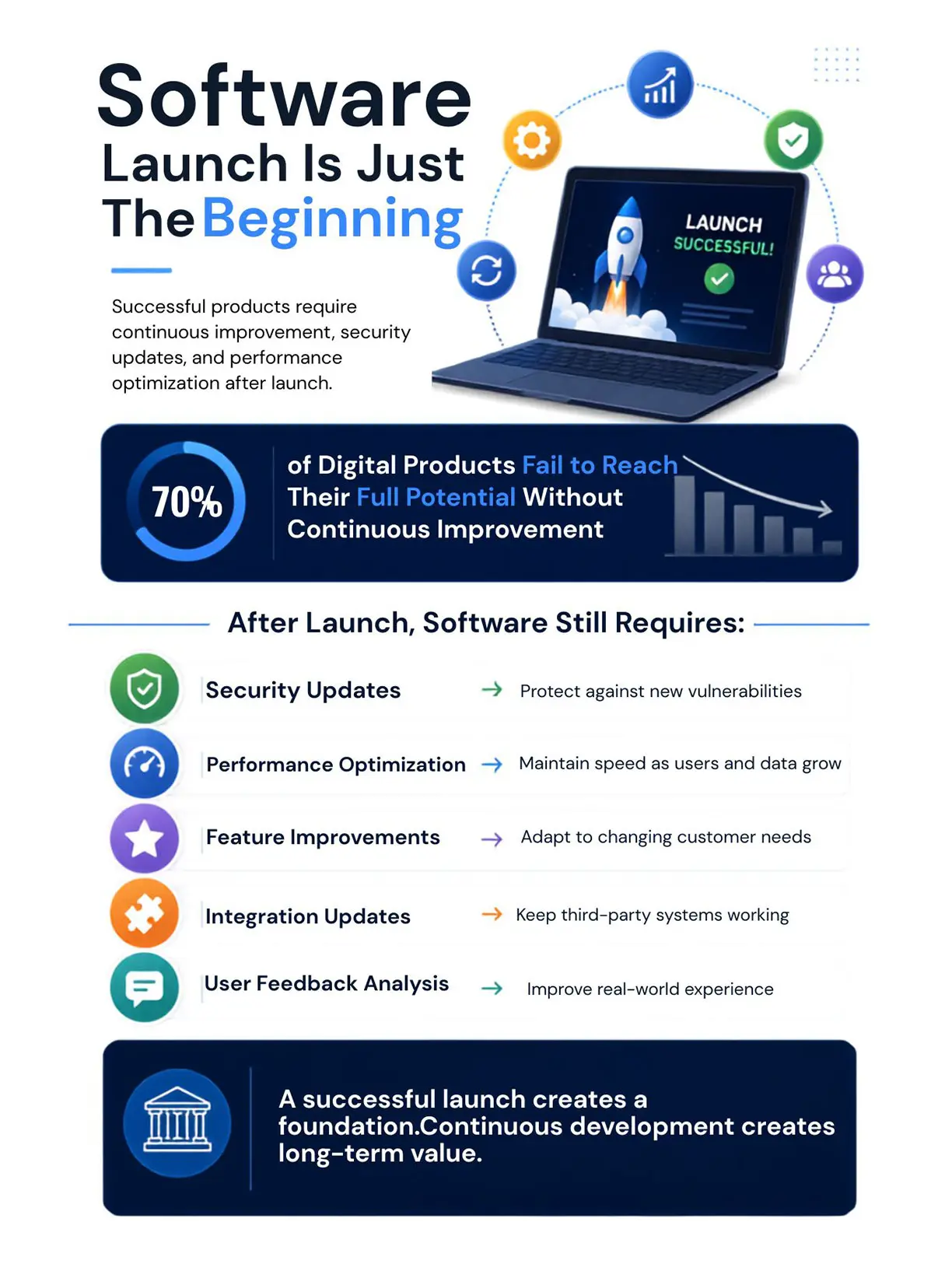
The launch stage indicates that a product is ready for use, but it does not guarantee that it will remain useful forever. Users bring new demands, and those demands often reveal gaps that were not visible during development.
A business may launch a customer portal, SaaS platform, mobile app, internal dashboard, or e-commerce system with all planned features included. Still, after a few weeks, users may report slow-loading pages, confusing steps, missing filters, broken payment flows, or unclear notifications. These are not always signs of poor development but indicate that software has entered a live environment.
Post-launch development helps a company respond to this reality. It gives the product a structured way to grow, rather than leaving updates to last-minute decisions.
Common post-launch needs include:
- Fixing bugs found by users.
- Improving slow or difficult workflows.
- Updating security patches.
- Adding small but useful features.
- Adjusting the product to new business rules.
- Improving reports, dashboards, and admin tools.
- Updating integrations with external platforms.
- Removing outdated features that no longer help users.
This is especially important in custom software development, where the product is built around a company’s specific workflows. When those workflows change, the software must also change. Otherwise, teams may return to spreadsheets, manual work, and disconnected tools.
What Post-Launch Software Support Really Includes
Post-launch support is broader than answering tickets. It includes technical care, product improvement, user support, security checks, and future planning. A useful support model treats software as a living business asset.
Corrective Support
Corrective support focuses on fixing problems. These may include errors, broken buttons, failed reports, login issues, incorrect calculations, or problems with integrations.
For example, an order management system may perform well during testing but fail when a large number of orders arrive simultaneously. Corrective support helps the team identify the cause, fix the problem, and reduce the likelihood of the same issue recurring.
Adaptive Support
Adaptive support helps software keep working when the outside environment changes. This could include changes in browsers, operating systems, payment gateways, APIs, tax rules, or compliance needs.
A SaaS product may depend on a third-party billing platform. If that platform changes its API, the SaaS product may need an update. Without adaptive support, a feature that once worked well can suddenly stop working.
Performance Support
Performance support focuses on speed, uptime, and stability. When slow software affects user patience, employee output, and customer trust, even a small delay can affect sales, support teams, and daily operations.
Performance support may include database checks, code improvements, server review, caching, and load testing. These actions help the product handle more users, more data, and more business activity.
Security Support
Security support is one of the most important parts of post-launch care. A product may be secure at launch, but new risks can appear later. Old libraries, weak passwords, missed patches, or outdated permissions can create serious problems.
A planned software maintenance and support model gives the business a way to review its new software’s vulnerabilities, apply patches, check access controls, and respond quickly when risks are found. This is not only a technical concern. It protects customer trust, brand reputation, and business continuity.
Common Post-Launch Software Support Models
Different businesses need different levels of post-launch care. The right model depends on product size, user base, risk level, budget, and business goals.
Break-Fix Support Model
In the break-fix model, the support team steps in only when something goes wrong. This model can work for very small tools with limited use, but it is risky for customer-facing products or business-critical systems.
The main issue with break-fix support is the delay in identifying and resolving problems. By the time a team notices an issue, users may already be facing errors, failed actions, or downtime. A business may also spend more on emergency repairs than it would have spent on regular care.
Dedicated Support Team Model
In this model, a specific team is assigned to support and improve the product. The team may include developers, testers, a project manager, and a support lead. This model works well for products that need regular updates or have active users.
A dedicated model is useful when a business wants faster response times, deeper product knowledge, and planned development after launch. It is also common in custom software development projects where the product has unique business logic that requires context.
Retainer-Based Support Model
A retainer model gives the business a fixed number of monthly support hours. These hours can be used for bug fixes, small improvements, monitoring, updates, or technical advice.
This model works well for companies that need steady support but do not need a full-time team. It also helps with budget planning because monthly costs are more predictable.
SLA-Based Support Model
An SLA-based model defines response times based on issue priority. For example, a critical outage may require a response within one hour, while a minor visual issue may be handled within a few days.
This model is useful for SaaS products, e-commerce platforms, financial tools, healthcare systems, and other products where downtime can affect revenue or service delivery.
Continuous Development Model
Continuous development treats the product as an ongoing roadmap rather than a completed project. The team reviews feedback, studies product data, adds improvements, and releases updates regularly.
This model is often best for SaaS products and digital platforms that compete in active markets. It helps the product keep pace with customer needs and competitor movement.
What's the Budget for Ongoing Software Maintenance and Support?
The typical budget for ongoing software maintenance depends on the size, complexity, and risk level of the product. Many businesses use a planning range of 15% to 25% of the original development cost per year. However, this should be treated as a general estimate, not a fixed rule.
A simple internal tool may need a smaller support budget. However, a customer-facing SaaS product, payment platform, or healthcare application may need a larger budget because the cost of downtime, data loss, or poor performance is much higher.
Here are several factors that influence the budget:
- Number of active users
- Size of the codebase
- Number of integrations
- Hosting and infrastructure needs
- Security and compliance requirements
- Frequency of updates
- Age of the product
- Quality of the original development work
- Level of documentation
- Expected response times
A business should not view support as an optional expense after launch. It should be part of the product’s total cost from the beginning. When software maintenance and support is planned early, the company can avoid rushed decisions and sudden repair costs later.
Budget Planning by Product Type
A small internal tool may only need basic monitoring, minor bug fixes, and occasional updates. But a mid-sized business platform may need monthly improvement work, regular security checks, and user support. And a SaaS product may require frequent releases, uptime monitoring, user feedback review, and a clear roadmap. The more important the software is to revenue or operations, the stronger the support budget should be.
Why the Cheapest Support Is Not Always the Best Choice
A low-cost support plan can look attractive in the beginning, but it may not provide enough protection. If the team only reacts when something breaks, the business may still face downtime, unhappy users, and emergency repair work.
A better approach is to match the support budget with the product’s business role. Software that supports sales, customers, payments, logistics, or operations needs more than occasional attention.
How Often Should SaaS Products Receive Updates and New Features?
SaaS products usually need regular updates because users expect the product to improve over time. The update schedule depends on the product stage, user base, and technical maturity.
A young SaaS product, which is still new in the market and learning from early users, may release small improvements every week or every two weeks. At this stage, frequent updates help the team respond to feedback quickly. On the other hand, a mature SaaS product that already has a stable user base and established features may follow a monthly or quarterly release plan for larger changes while still applying bug fixes and security patches as needed.
The best update frequency is not always the fastest one. It is the one that balances user value, product stability, and team capacity.
Common Update Cadences for SaaS Products
SaaS products may follow different cadences depending on their needs:
- Critical fixes: as soon as possible
- Security patches: as soon as tested and approved
- Small improvements: weekly or biweekly
- Feature updates: monthly or quarterly
- Major product changes: planned around a roadmap
The key here is consistency, where users should feel that the product is active, reliable, and improving. At the same time, the team should avoid releasing changes so often that users feel confused or the product becomes unstable.
What Should Decide the Update Schedule?
A SaaS team should look at user feedback, product data, support tickets, technical debt, security risks, and business goals. An update should not be released only because the calendar says so. It should solve a real problem or add clear value.
For companies working with custom software development teams, this means the roadmap should remain active after launch. The business should review what users actually need, not only what was planned before launch.
Why Small Updates Often Work Better
Small updates are easier to test, explain, and roll back if something goes wrong. They also help users adapt gradually. Instead of waiting six months for a large release, the product can improve in smaller steps. This approach reduces risk and helps the business learn faster from real user behaviour.
What Happens If Businesses Don't Invest in Post-Launch Software Development?
A product that receives no post-launch attention can gradually lose its value, even if it continues to open and function on the surface. Over time, it may become harder for users to complete tasks, less secure, and less suitable for the business's changing needs.
In most cases, this decline happens step by step rather than all at once. At first, users may report small issues that seem easy to ignore. However, those issues can soon lead to repeated complaints, manual workarounds, and slower daily operations. As a result, customers may become frustrated, support tickets may increase, and the product may become harder to update because the code has not received regular maintenance. Over time, the business may face higher costs than it would have faced with regular support.
Technical Debt Builds Up
Technical debt means the product carries old code, outdated tools, messy fixes, or unfinished improvements. Some technical debt is normal, but unmanaged debt becomes expensive.
When a company delays updates for too long, even simple changes can take longer than they should. Developers may need to fix old problems before adding new features. This slows down growth and raises costs.
Security Risks Increase
Security is not a one-time task, as new threats, exposed libraries, weak access rules, and old dependencies can create risk after launch.
Without software maintenance and support, the business may miss important patches or fail to respond quickly to vulnerabilities. This can put customer data, internal systems, and business reputation at risk.
User Trust Can Decline
Users judge software by daily experience. If pages load slowly, forms fail, reports break, or features feel outdated, users begin to lose confidence. They may stop using the product or move to another option.
For internal tools, employees may return to manual methods. For customer-facing tools, users may cancel subscriptions, abandon purchases, or contact support more often.
Should Software Support Be In-House or Outsourced?
The choice between in-house and outsourced support depends on the company’s skills, budget, product complexity, and long-term goals. There is no single best answer for every business.
An in-house team gives the company direct control and deep business knowledge. An outsourced team can provide flexible skills, faster scaling, and access to specialists. Some companies use a hybrid model, where internal teams handle strategy and outsourced experts handle development, software testing, monitoring, or specific technical tasks.
When In-House Support Works Well
In-house support may be a good choice when the product is central to the company’s daily operations and needs constant attention. It can also work when the company already has strong technical leadership and enough budget to hire and retain skilled people.
Benefits of in-house support include:
- A direct knowledge of business goals.
- Faster access to internal stakeholders.
- Stronger control over priorities.
- Long-term product familiarity.
- A close connection with company culture.
However, in-house support can be costly as hiring, training, salaries, tools, and management overhead all add up. Small companies may also struggle to cover every skill needed.
When Outsourced Support Works Well
Outsourced support may be useful when a company needs expert help but does not want to build a full technical team. It can also help when the product needs ongoing improvement but not enough work for several full-time employees.
Benefits of outsourced support include:
- Access to different technical skills.
- Flexible team size.
- Less hiring pressure.
- Support for testing, bug fixes, and updates.
- Faster start for businesses without internal developers.
Outsourcing works best when communication is clear, responsibilities are documented, and response times are agreed to in advance.
When a Hybrid Model Makes Sense
A hybrid model gives the business both control and flexibility. Internal teams can own product direction, user priorities, and business goals. External teams can handle development tasks, maintenance work, testing, and technical improvements.
This model is often practical for custom software development because the business keeps ownership of the roadmap while still getting technical depth when needed.
How to Measure Software Health and Identify When Updates Are Needed
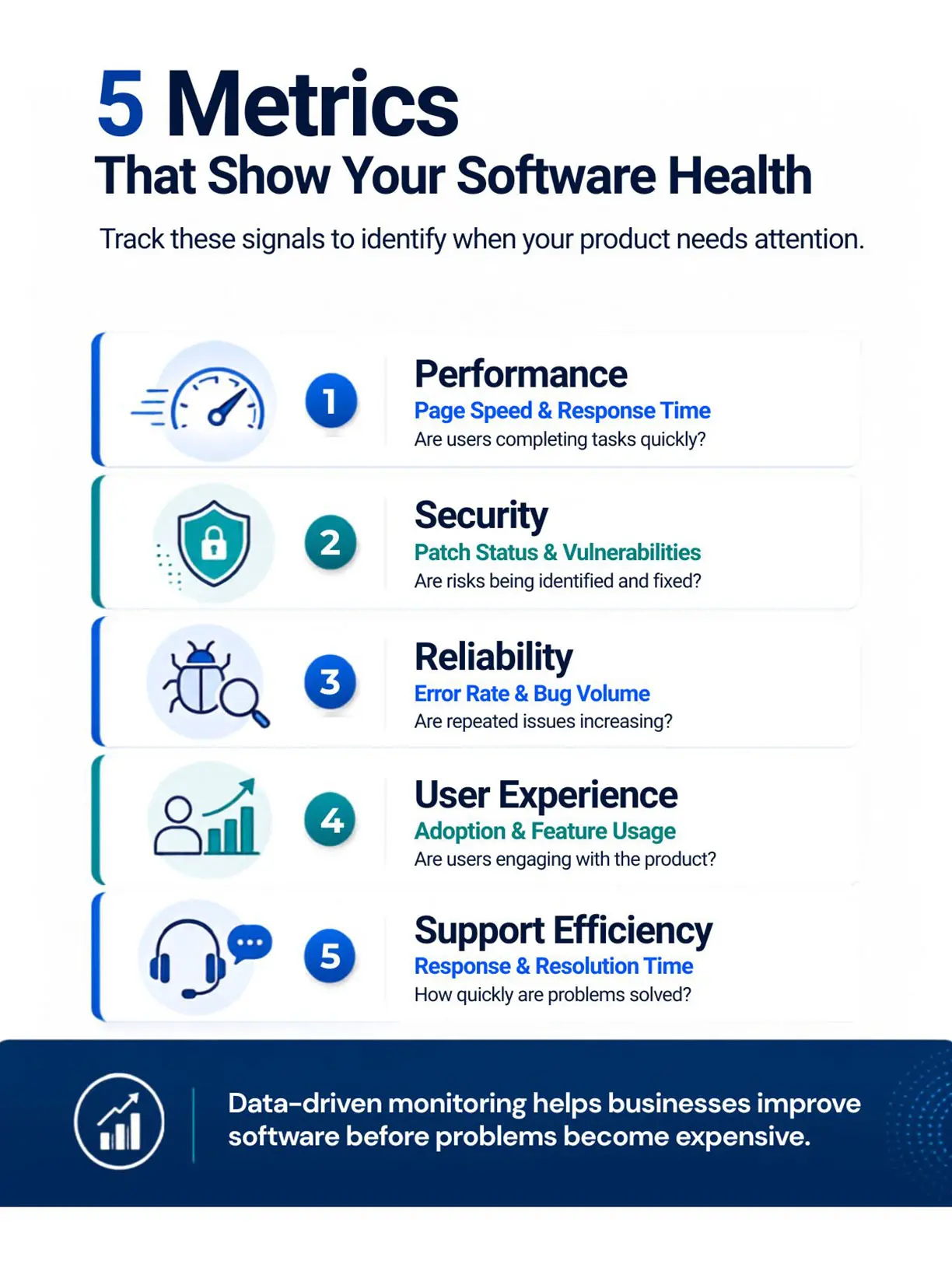
Software health should be measured through data, user feedback, and technical review. A product may look fine on the surface but still have hidden problems that affect its performance, security, or future growth.
A business should track both technical and user-focused signals. This helps leaders decide when to fix, improve, or rebuild parts of the product.
Key Software Health Metrics
Important metrics that determine the health of the software include:
- Uptime: how often the product is available
- Page load speed: how fast users can complete tasks
- Error rate: how often users face failed actions
- Bug volume: how many issues are reported
- Repeat incidents: how often the same problems return
- Response time: how quickly support reacts
- Resolution time: how quickly issues are fixed
- User adoption: how many people actively use the product
- Feature usage: which features are used or ignored
- Support ticket trends: what users complain about most
- Security patch status: whether important updates are current
These metrics help the team move away from guesswork. They show whether the product is healthy, slowing down, or becoming risky.
Warning Signs That Updates Are Needed
A product may need updates when:
- Users consistently report the same problems;
- The system starts to slow down due to a growing amount of data;
- The volume of support tickets increases after each release;
- Outdated functions no longer align with the way the organization conducts business;
- Integrations are failing more frequently;
- Security patches are overdue;
- Employees find themselves using manual workarounds;
- Customers are continually requesting functionality that competitors have already implemented;
- Development teams are taking too long to implement small changes.
These warning signs should not be ignored. They show that the product needs attention before small issues become larger problems.
Why Regular Reviews Matter
A monthly or quarterly product health review can help the business stay ahead of potential breakdowns. The review should include technical performance, user feedback, support tickets, security updates, and roadmap priorities.
A strong software maintenance and support plan should include these reviews as a standard practice. This gives decision-makers a clearer view of product risk, cost, and future value.
How Ongoing Development Protects Business Value
Software is often connected to sales, service, operations, finance, reporting, or customer experience. When software performs well, the business works better. When it fails, the effect can spread quickly.
Ongoing development protects business value by keeping the product useful, safe, and ready for change.
It Keeps the Product Relevant
Business needs, customer expectations, and competitor offerings continue to change after a product goes live. When a product does not improve with these changes, it can slowly fall behind, even if it performed well at the time of launch.
Ongoing development helps the business add features that users need, remove points of friction, and adjust the product as new goals, workflows, and market demands appear.
It Reduces Long-Term Costs
Regular maintenance can reduce the need for emergency fixes, rushed patches, and large rebuilds. In most cases, small improvements are easier to manage than delayed repairs because issues can be handled before they affect users or business operations.
This is especially true for growing SaaS platforms, e-commerce systems, customer portals, booking platforms, and internal business tools. As more users, data, features, and integrations are added, these products need regular care to remain stable, secure, and ready for daily use.
It Supports A Better User Experience
A slow page, unclear button, failed upload, or broken report can affect how users feel about the product. Ongoing development helps remove these problems over time.
A better user experience can lead to higher adoption, fewer complaints, and better customer retention.
It Gives Leaders Better Control
When support is planned, leaders can make decisions based on data. They can see what needs urgent attention, what can wait, and what should be part of the roadmap.
This is much better than reacting only when something breaks.
Building a Practical Post-Launch Support Plan
A support plan does not need to be complicated. It should be clear, realistic, and connected to your business priorities.
Define Support Levels
A business should clearly define what counts as a critical, high, medium, or low-priority issue before the product goes live. For example, a full system outage, payment failure, or login problem needs faster attention than a minor layout issue or small text correction. When these priority levels are clearly documented, the support team can respond based on business impact instead of treating every issue the same way.
Set Response and Resolution Targets
The support plan should also explain how quickly the team will acknowledge and fix different types of issues. Response time refers to how quickly the team confirms that a reported problem has been received, while resolution time refers to how long it takes to solve the issue. By setting these targets in advance, the business can manage user expectations and give the support team a clear process to follow.
Keep Documentation Updated
Updated documentation makes future support work easier because developers can understand how the product is built, how important workflows function, and where key system details are stored.
It should include business logic, setup steps, user roles, API details, important integrations, and known issues. Without proper documentation, even small support tasks can take longer because the team may need extra time to understand the product before making changes.
Collect Feedback From Real Users
Real user feedback gives the business a practical view of what needs improvement after launch. Support tickets, surveys, customer calls, team feedback, and product analytics can show where users face difficulty, which features are useful, and which areas need attention. As a result, future updates can be based on actual product usage rather than assumptions made before launch.
Review the Roadmap Regularly
A product roadmap should not remain fixed after launch because real usage often brings new priorities. The team should review the roadmap regularly and update it based on user behaviour, business changes, technical needs, and support trends. This helps the product grow in the right direction instead of continuing with outdated plans that may no longer match your current goals.
A successful launch is important, but it is not enough to protect a software product for the long term. Post-launch support gives the business a practical way to protect its investment. It reduces risk, improves user experience, controls long-term costs, and keeps the product aligned with changing business needs. For companies investing in custom software development, ongoing support should be planned from the beginning. The strongest products are not only built well before launch. They are improved with discipline after launch. That is where software begins to prove its real value.
Frequently Asked Questions
1. What are the benefits of post-launch software support?
Post-launch software support has several benefits, including fixing bugs, improving performance, supporting the safety of the product, and keeping the software relevant as business needs change. These benefits help organizations be successful with their software.
2. What areas do software maintenance and support generally cover?
3. How long should a business continue software maintenance after launch?
4. Does post-launch support lower costs for future development?
5. Is post-launch support needed for custom software development projects?
Request a
Free Quote Today!


