


Table of Contents


Software can appear stable during internal checks, only to reveal critical issues once it reaches real users. For instance, a payment process might fail during high traffic, or a small issue, such as failing to verify a user’s email address, could expose sensitive data. These situations are not rare and reflect deeper gaps in how the quality of the software is managed during its development.
Modern software systems are complex, distributed, and often updated continuously. Ensuring their reliability requires more than just verifying functionality at the end of development. It demands a structured approach to both building and validating quality.
This is where the distinction between software testing and quality assurance becomes essential. While they are closely related, they serve different purposes and operate at different levels within the software development lifecycle.
Understanding how they differ and how they complement each other helps teams reduce risk, improve efficiency, and deliver more dependable software.
Understanding the Synergy Between Software Testing and Quality Assurance
Software testing and quality assurance are often mentioned together, but they serve different roles within the software development lifecycle.
Software testing focuses on validating the product’s utility and the objective it will serve. It answers a direct question: Does the system behave as expected under defined conditions? The process of software testing involves running the software, observing outcomes, and identifying deviations from requirements.
Quality assurance, in contrast, focuses on the process used to build the product. It asks a broader question: whether the right practices are followed to ensure quality is built into the system from the beginning.
This distinction is foundational. Software testing focuses on executing the system to identify issues that arise during its use, providing immediate feedback on the product. Whereas quality assurance (QA) operates at a higher level, aiming to improve and refine processes across the development cycle.
Without QA, testing becomes reactive and repetitive. Without software testing, QA lacks measurable confirmation of the software. Together, they form a complete quality strategy.
What Is Software Testing?
Software testing is a structured process for evaluating a system by executing it under controlled conditions. Here, these conditions may involve verifying that a user can log in with valid credentials or ensuring that the system performs correctly under high traffic, such as one thousand simultaneous users.
The goal is to identify defects, inconsistencies, and deviations from expected behaviour. It is one of the most visible aspects of quality management because it directly interacts with the product.
Understanding the Core Purpose of Software Testing
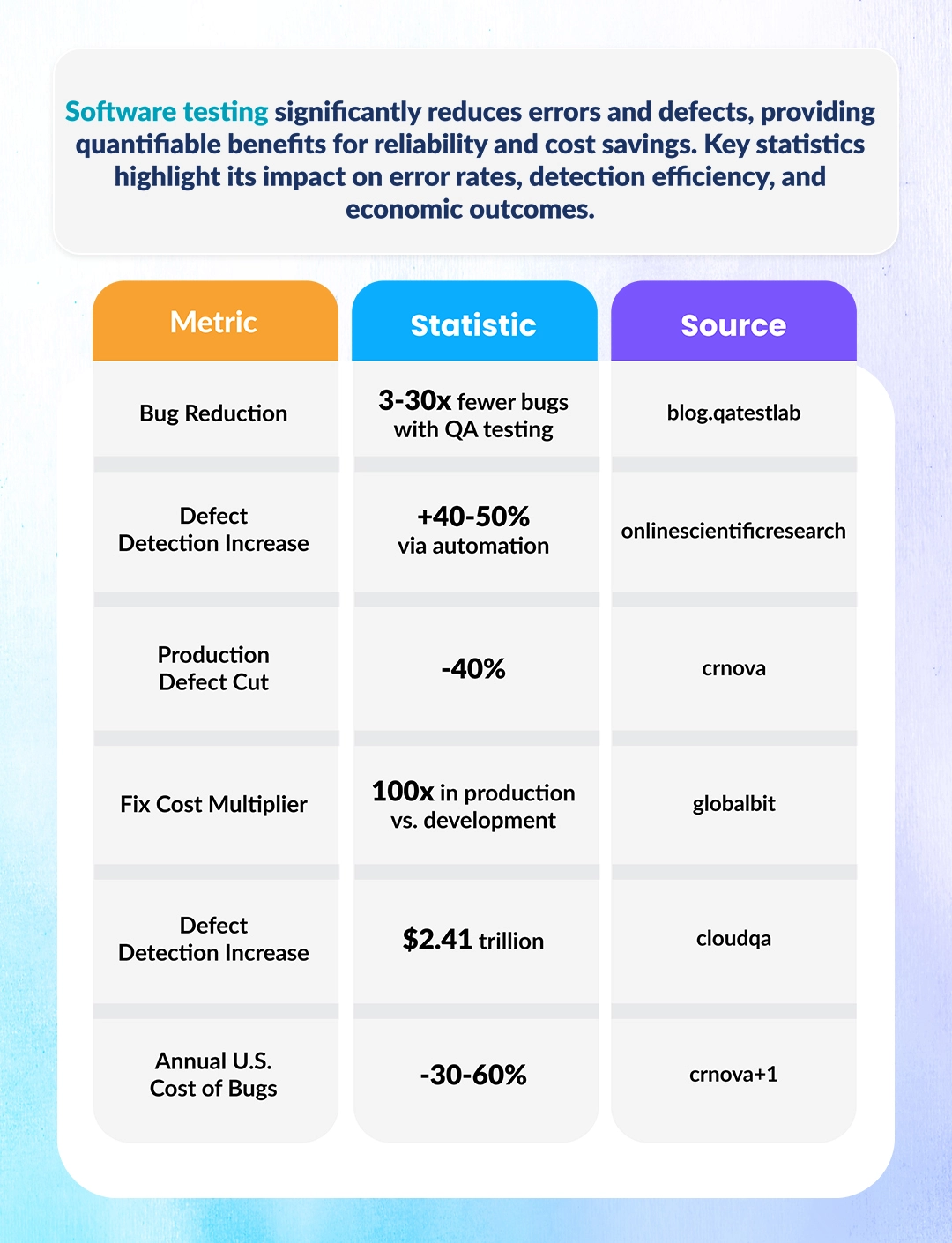
The primary purpose of software testing is to ensure that the application functions correctly and reliably. This includes verifying that features work as intended, that integrations behave properly, and that the system handles both normal scenarios and edge cases.
Software testing also plays a critical role in reducing risk, particularly by identifying and addressing potential issues that could impact the system's functionality, security, and user experience. Hence, identifying these defects before release helps prevent failures that could affect users, business operations, or compliance requirements.
Beyond defect detection, software testing provides measurable evidence to inform decisions about release readiness, based on actual results rather than assumptions.
Highlighting Key Objectives of Software Testing
Software testing is a non-negotiable part of the software development process as it aims to verify that the product aligns with requirements, uncover potential issues early, and guarantee consistent performance across various conditions. Here's a closer look at these essential goals:
1. Verify functionality against requirements
Every feature is built based on documented requirements, which are detailed specifications that outline what the software is expected to do. This includes specific functionalities, input conditions, expected outputs, and business rules. Testing ensures that these requirements are correctly implemented by validating input conditions, expected outputs, and business rules.
2. Detect defects before deployment
Defects discovered late in the development cycle are often more costly to fix. Testing helps identify issues early, reducing rework and preventing defects from reaching production.
3. Ensure the product works as intended
Software testing evaluates the product's reliability, stability, and overall performance. It ensures that the system performs correctly across different environments, devices, and usage conditions.
Types of Software Testing
Software testing is not a single activity; it comprises multiple categories, each targeting specific aspects of the system.
1. Functional Testing
Functional testing verifies that each software feature works as intended, ensuring the system meets its specified requirements. It checks tasks such as input processing, output generation, and system interactions to confirm that the software performs its intended functions.
- Unit Testing: This is the first level of testing, typically performed by developers. It checks individual pieces of code, such as functions or methods, to ensure they work correctly on their own before they are combined with other parts of the system.
- Integration Testing: Integration testing checks how different parts of the software work together. It looks for problems in how data is shared, how components communicate, and how modules depend on each other, ensuring they function correctly as a whole.
- System Testing: At this stage, the entire application is tested as a complete system. It ensures that all integrated components work together and meet overall requirements.
- Acceptance Testing (UAT): This is conducted by end users or stakeholders. It validates whether the system meets business needs and is ready for deployment in a real-world environment.
2. Non-Functional Testing
Non-functional testing focuses on evaluating system aspects that aren’t directly related to specific functionalities but are vital for the overall software quality, including performance, security, and user experience. These tests assess how the system behaves under different conditions, such as high user traffic or various environmental stresses.
- Performance Testing: This evaluates a system's overall speed, responsiveness, and resource usage under normal operating conditions. This includes how quickly the system responds to user requests and how efficiently it uses resources like memory and processing power. The goal is to ensure the software remains fast and responsive even under heavy usage.
- Load Testing: Load testing simulates realistic user demand by subjecting the system to expected loads. It tests the software’s ability to handle many users simultaneously without performance degradation or failures. By simulating peak usage, this testing helps uncover any weaknesses in the system’s capacity to maintain stability under pressure.
- Security Testing: Security testing identifies potential vulnerabilities in a system that could be exploited to compromise data or operations. It ensures that the application has effective protection mechanisms, such as encryption and secure login protocols, to safeguard sensitive information and prevent unauthorized access.
- Usability Testing: This assesses how easy and intuitive the system is for end users. It focuses on the design and user interface, ensuring that the application is straightforward to navigate and that users can complete tasks efficiently. The aim is to improve the overall user experience by identifying and addressing any usability challenges.
3. Manual Vs Automated Testing
Manual testing involves human execution of test cases, which is useful for exploratory testing and user experience evaluation. On the contrary, automated testing uses scripts and tools to efficiently execute repetitive test cases. It improves speed, consistency, and coverage, especially in large or frequently updated systems.
Comprehending the Software Testing Life Cycle (STLC)
The Software Testing Life Cycle (STLC) is a structured process that ensures consistency, traceability, and efficiency throughout the testing phase. It consists of several distinct stages, each designed to contribute to a thorough and methodical approach to software testing. These stages help ensure that testing activities are planned, executed, and documented consistently and in an organized manner, ultimately leading to the successful release of a reliable product.
-
Requirement Analysis:
In this initial phase, testers review the project requirements, often written by business analysts, to identify testable scenarios. They aim to understand the system's functional and non-functional aspects, identify ambiguities or gaps in requirements, and define the scope of testing. -
Test Planning:
Test planning involves creating a comprehensive strategy that defines the scope of testing, available resources, timelines, and tools required. It outlines the approach for various testing types (e.g., functional and non-functional) and sets clear objectives for each testing phase. The plan also includes risk assessments and strategies for mitigating potential testing challenges. -
Test Case Design:
Test case design involves translating the requirements into detailed test cases. These cases describe the specific conditions, inputs, actions, expected results, and any special test conditions. A well-structured test case ensures clarity and enables test repeatability, verifying the system's functionality and behaviour under various conditions. -
Environment Setup:
In this phase, the testing team sets up the test environment, including hardware, software, and network configurations, to mimic real-world operating conditions. The environment should closely mirror the production environment to ensure accurate testing results. The setup includes preparing test data, configuring testing tools, and validating the environment for readiness. -
Test Execution:
During test execution, the actual test cases are run according to the test plan. Testers carefully log results and compare actual outcomes with expected results. Any discrepancies are noted as defects or issues, tracked, and communicated for resolution. This phase is iterative, and tests may be re-executed if necessary after defects are fixed. -
Test Closure:
Test closure marks the end of the testing cycle. It involves evaluating the testing process, reviewing defect logs, and ensuring that all test cases have been executed. Testers also prepare detailed reports summarizing test results, lessons learned, and any remaining open issues. These insights inform future testing efforts and provide a basis for continuous improvement.
What Is Quality Assurance (QA)?
Quality Assurance (QA) is a systematic, process-driven approach aimed at improving the overall development process to prevent defects before they occur. Unlike testing, which identifies problems after they arise, QA focuses on optimizing workflows, defining standards, and implementing practices that reduce the risk of errors throughout the software development lifecycle.
QA is not confined to one stage but is integrated into every phase of the SDLC—from requirements gathering and design to coding, testing, and deployment. By embedding quality practices at every step, QA ensures that development teams follow best practices and maintain consistency, reliability, and security. This proactive approach helps mitigate issues early, improve product quality, and ensure the final product meets both business requirements and user expectations.
Understanding the Core Purpose of QA
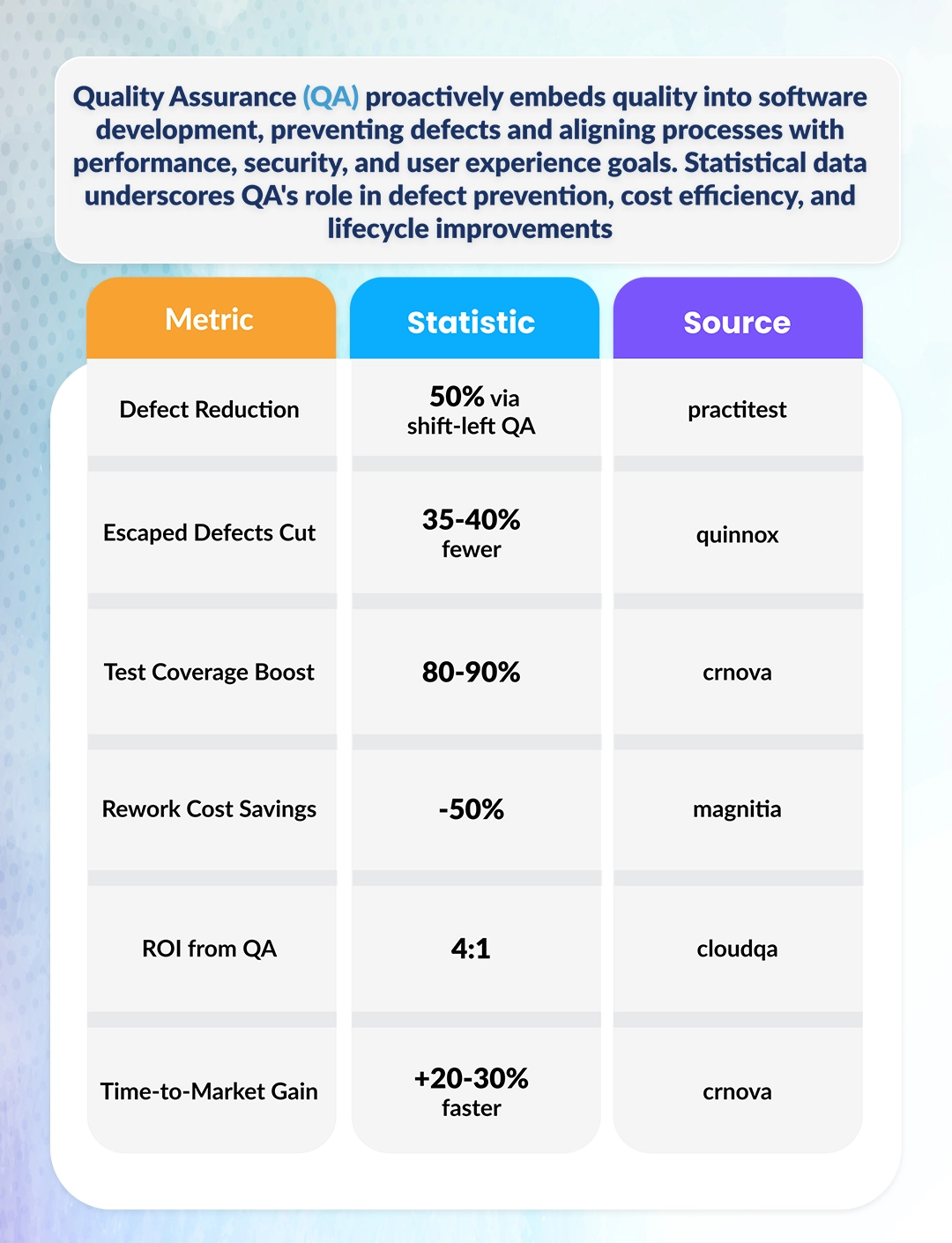
The core purpose of quality assurance (QA) is to proactively ensure high-quality standards throughout the software development lifecycle. Rather than focusing on identifying defects after they occur, QA’s goal is to create processes, guidelines, and methodologies that reduce the likelihood of defects from the outset. By establishing clear expectations for quality at each stage of development, QA helps prevent issues before they arise.
QA ensures that development efforts align with critical quality factors, including performance, security, functionality, and user experience. The focus is on embedding quality into the product from the beginning, not inspecting it afterward. In this way, QA fosters a culture of continuous improvement, shifting the emphasis from fixing issues to building a reliable and high-quality system from day one.
Highlighting Key Objectives of Quality Assurance
To ensure the final product meets the highest quality standards, QA focuses on several key objectives that guide the development process. These objectives aim to prevent errors, optimize workflows, and ensure compliance with necessary regulations, all of which contribute to creating a reliable and secure product.
1. Prevent defects rather than detect them
QA's primary goal is to establish preventive measures rather than waiting for issues to appear. By identifying potential risks early in the development process, QA helps to implement solutions that reduce the chances of defects, leading to fewer errors and smoother project timelines. This proactive approach ensures that quality is built into the system rather than being an afterthought.
2. Improve development processes
QA not only focuses on the product but also enhances the entire development process. It identifies inefficiencies, weak communication, and bottlenecks that may hinder progress or quality. By refining workflows, streamlining team collaboration, and standardizing practices, QA ensures that development remains efficient, transparent, and consistent, ultimately boosting productivity and reducing waste.
3. Meeting standards and compliance
QA ensures the software adheres to industry standards and regulatory requirements essential to operational success. This includes aligning with specific guidelines, such as ISO standards, GDPR, and HIPAA,for data security and privacy.
By enforcing these standards, QA mitigates the risks of legal or compliance issues, safeguarding the business and ensuring customer trust.
Core Principles of QA
The core principles of quality assurance (QA) focus on maintaining high standards throughout development, emphasizing process optimization, adherence to standards, and continuous improvement to ensure superior quality.
1. Process improvement
QA continuously evaluates and refines development practices by identifying inefficiencies and implementing best practices. Automation tools for code review, testing, and deployment help streamline workflows and reduce defects, making the development process more efficient and aligned with business goals.
2. Adherence to standards
QA ensures compliance with established standards like ISO 9001 and CMMI, which provide structured methodologies for process management and risk mitigation. These frameworks guide QA teams in maintaining consistency and quality throughout all development phases, ensuring adherence to best practices and regulatory compliance.
3. Continuous improvement mindset
QA fosters ongoing improvement by analyzing feedback and metrics to identify areas for enhancement. By using insights from testing, performance data, and user feedback, QA helps teams adapt to new technologies, refine development practices, and consistently deliver reliable software.
Integration of QA in the Software Development Life Cycle (SDLC)
QA is integrated into every phase of the software development process to ensure that quality is maintained throughout. This approach helps developers build a product that meets both functional and non-functional requirements, reducing the risk of issues later in the cycle. Here's how QA is incorporated at each stage:
-
Requirement Reviews to Ensure Clarity and Completeness
-
Defining Coding Standards and Development Guidelines
-
Conducting Audits and Peer Reviews
-
Performing Risk Analysis and Mitigation Planning
-
Tracking Metrics Such as Defect Density and Code Quality
QA reviews project requirements to ensure they are clear, complete, and testable before development starts. This helps prevent misunderstandings and ensures all aspects of the software are well-defined.
QA helps establish coding standards to ensure code consistency, efficiency, and ease of maintenance. Following these standards reduces the likelihood of defects and makes the codebase easier to manage.
QA conducts audits and facilitates peer reviews, in which team members review each other's work. These reviews catch issues early, ensuring that the code adheres to quality standards and reducing errors.
QA identifies potential risks early in the development process and collaborates with the team to develop strategies to mitigate them, preventing problems before they arise.
QA tracks key metrics, such as defect density and code quality, to monitor the project's health. These metrics help provide insights into areas that need improvement and guide corrective actions.
These activities help create a stable and predictable development environment.
Software Testing vs. Quality Assurance: Key Differences
Understanding the difference between software testing and quality assurance helps teams across the organization deploy them efficiently into the system.
| Basis of Difference | Software Testing | Quality Assurance |
|---|---|---|
| 1. Definition | The process of identifying defects in the software. | A process-oriented practice that ensures quality through continuous improvement. |
| 2. Focus | Software testing focuses on finding and fixing defects. | Quality assurance focuses on improving processes to prevent defects. |
| 3. Nature | It has a reactive nature, i.e. fixes issues as they arise. | It has a proactive nature, i.e. aims to prevent defects before they occur. |
| 4. Methods | Software testing involves both manual and automated techniques to assess software functionality and performance. | Quality assurance involves process improvement activities, documentation, and reviews to ensure that quality standards are maintained throughout the development cycle. |
| 5. Phase in SDLC | Software testing takes place after the development phase, once the software is built, to ensure it meets requirements. | Quality assurance is involved at all stages of the Software Development Life Cycle (SDLC), from initial planning through final deployment and maintenance. |
| 6. Tools Used | Software testing relies on specialized testing tools like Selenium, QTP, and other automated or manual testing utilities. | Quality assurance uses process, audit, and review tools to evaluate and refine development processes to achieve better quality outcomes. |
| 7. Role in SDLC | Software testing verifies that the software product works as expected and meets its functional requirements. | Quality assurance ensures that the processes used for software development and testing are efficient, standardized, and optimized to prevent defects. |
| 8. Goal | The goal of software testing is to identify defects and ensure the product functions correctly and meets all specified requirements. | The goal of quality assurance is to optimize the development process and ensure a consistent, defect-free product from the start. |
| 9. Responsibility | Software testing is primarily the responsibility of Test Engineers and QA Testers, who perform the tests and report defects. | Quality assurance is the responsibility of QA Engineers and Managers, who focus on improving the overall development and testing processes. |
| 10. Outcome | The outcome of software testing is a product that is free from defects and performs as expected. | The outcome of quality assurance is a product developed through optimized processes that prevent defects, ensuring consistent, high-quality results. |
Real-World Examples of Software Testing and QA
To understand the practical impact of software testing and quality assurance,let's explore how these practices are applied across various industries to ensure functionality, security, and compliance in real-world applications.
1. E-Commerce Platform
In e-commerce, ensuring a smooth user experience and secure transactions is essential. QA teams define workflows and security standards, while testing ensures the functionality of features like the shopping cart, payment processing, and order management.
For instance, Amazon rigorously tests payment systems and workflows to handle peak traffic during events like Black Friday, preventing sales losses and user frustration.
2. Healthcare Application
Healthcare software must meet strict data protection regulations. QA ensures compliance with laws such as HIPAA, while testing verifies secure data handling, access controls, and system reliability.
Cerner, a leader in health IT, tests patient data security and ensures that healthcare professionals can access accurate, reliable information in real-time, minimizing risks to patient care.
3. Banking / Fintech Software
In banking and fintech, security and transaction accuracy are critical. QA enforces encryption protocols and conducts security audits, while testing ensures correct transaction processing and system performance.
For example, PayPal tests transaction accuracy and system stability, especially during high-traffic periods, to prevent security breaches and errors.
Software testing and quality assurance address different aspects of software quality, yet they are deeply interconnected. Teams that rely only on testing often find themselves reacting to recurring issues. Teams that invest in QA build stronger foundations, reducing the need for repeated fixes. This combination leads to more stable releases and greater confidence in the product. For organizations considering quality assurance and testing services, the real benefit lies in aligning both disciplines to create a system where quality is not inspected at the end but built into every stage of development.
Frequently Asked Questions
1. What is the main difference between software testing and quality assurance ?
Testing identifies defects in the product after development, while QA focuses on improving processes, setting standards, and preventing defects throughout the software development lifecycle.
2. Is QA and software testing the same job?
3. Does software testing guarantee a bug-free product?
4. What are the key benefits of integrating QA into the Agile or DevOps development process?
5. How does QA contribute to the software development lifecycle (SDLC)?
Request a
Free Quote Today!


