


Table of Contents


Every growing business hits a technology crossroads at some point. The software that once handled daily operations starts becoming a liability, with webpages loading slowly and system updates breaking existing integrations. Also, over time, engineers who understand the original codebase leave the organization, and the institutional knowledge walks out with them.
At that point, leadership faces a choice with real financial and strategic weight. Should the current system be moved to the cloud, with the existing architecture mostly intact? Or is it time to rethink how the software is built and start from a cloud-native foundation?
The difference between these two paths affects how fast the business can ship product, how much the engineering team costs to maintain, and whether the present infrastructure can support future business growth. All of this without requiring emergency fixes every quarter.
This article breaks down both options and covers architecture trade-offs, a readiness assessment framework, how different project types factor in, and a cost comparison between cloud and on-premises infrastructure. Companies that align early with the right cloud application development services tend to build technical foundations that scale with the business rather than against it.
Cloud-Native Architecture: Benefits and Trade-offs
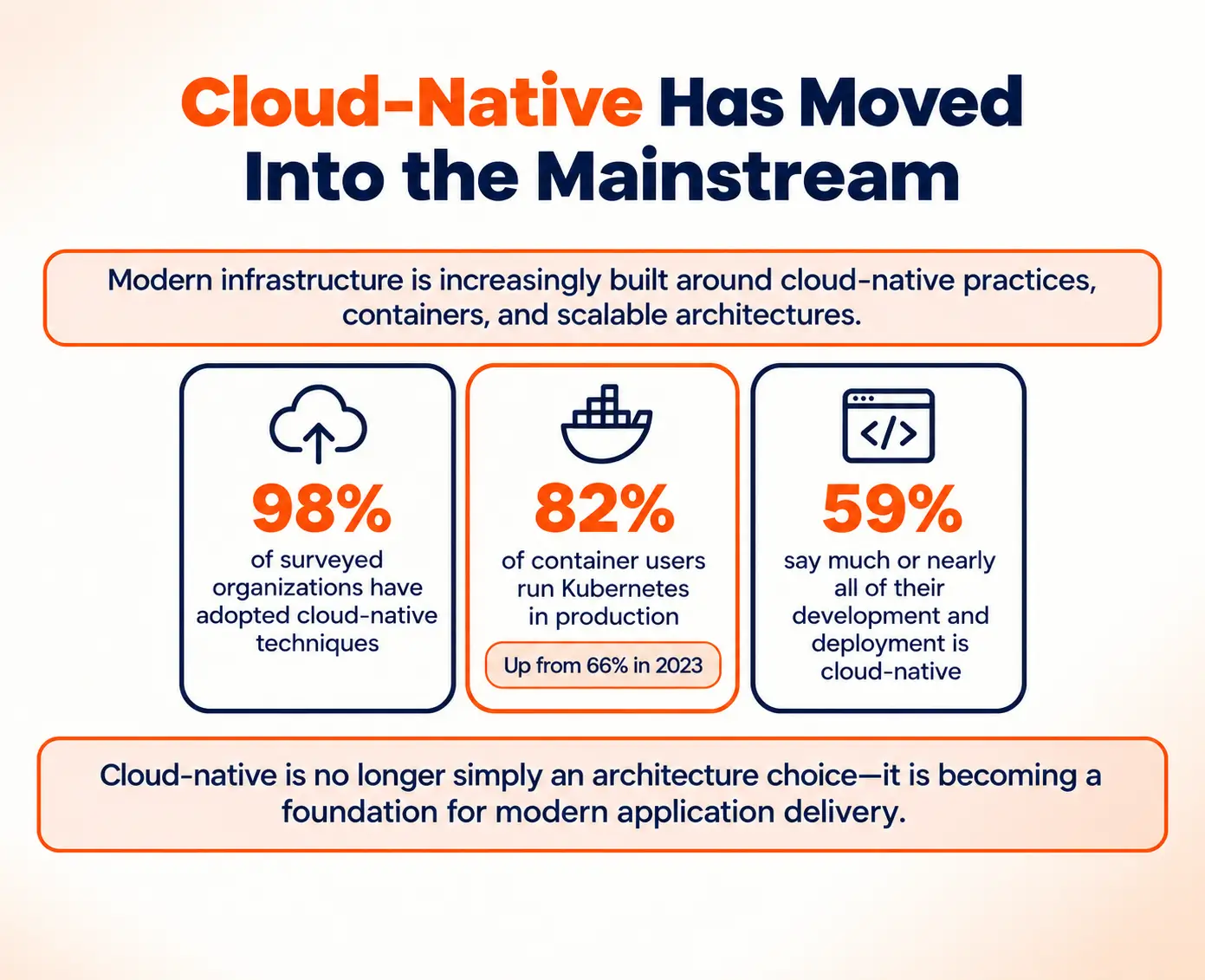
Cloud-native architecture is built to operate on cloud platforms such as AWS, Microsoft Azure, and Google Cloud. It is not just hosted there but fundamentally designed around what these platforms offer. Most traditional applications are built as one large block where the entire codebase lives and deploys together. So, when one feature needs an update, the whole system goes down for redeployment. When traffic increases on a single page, the entire application has to scale, even if the rest of it is sitting idle.
Cloud-native applications work differently. The application is broken into smaller, self-contained units where each one handles a specific job. As a result, teams can update, scale, or fix one unit without touching anything else. These units communicate with each other, and each one is packaged inside a lightweight package that behaves consistently regardless of where it is deployed.
What Makes Cloud-Native Worth Considering
To understand why cloud-native architecture stands out, it helps to know what it is being compared against. A monolithic system is one where the entire application runs as a single unit. Every feature, every function, and every component is bundled together and deployed as one. That structure works fine for smaller applications but creates real, recurring problems as the system grows.
Cloud-native architecture addresses those problems in a few specific ways:
- Component-level scalability: Monolithic systems scale all or nothing. Cloud-native systems scale only the component under pressure. During a sale, the checkout service gets more resources while the product catalogue and user accounts remain completely untouched.
- Independent release cycles: In a monolithic application, a bug fix in one service waits for every other team to be ready before it can deploy. In a cloud-native system, each service ships on its own schedule.
- Built-in failure handling: Monolithic systems typically need manual intervention when something breaks. Cloud-native platforms detect failures automatically, restart crashed components, and reroute traffic within seconds.
- No permanent platform lock-in: Because they are built on open standards like Kubernetes, cloud-native applications are not permanently tied to one cloud provider. If pricing or performance becomes a problem, the business can move without rebuilding from scratch.
- Parallel team development: Monolithic codebases create coordination bottlenecks because teams share the same deployment cycle. Cloud-native services are owned and deployed independently, so teams work in parallel without waiting on each other.
Cloud native app development services providers consistently highlight these structural advantages as the primary reason why businesses choose to build new rather than migrate. For organizations that compete on product velocity or need infrastructure that grows with demand, these benefits compound meaningfully over time.
Assessment Framework for Cloud Readiness
Before committing to building cloud-native or migrating existing software, businesses need an honest assessment of where they currently stand. Choosing the wrong path without this groundwork is one of the most common reasons why cloud projects run over budget or stall mid-execution.
A structured review covers three areas: technical health, business context, and organizational capability. Each one shapes the decision in a different way.
Technical Health Assessment
The codebase is where most organizations face their first reality check. Migration cost does not scale with the size of the application but with how tightly coupled and poorly documented the code is. A large but well-structured codebase can migrate cleanly. A small but tangled one can take months of preparation before migration even becomes feasible.
Questions that expose the real picture:
- How modular is the current architecture? If changing one part of the system regularly breaks something unrelated, the system is tightly coupled and migration will require significant refactoring before it can begin.
- Are there hard dependencies on on-premises hardware or proprietary infrastructure that the application cannot run without? These dependencies need to be replaced or re-architected before any move to the cloud.
- What level of automated test coverage exists? Migrating untested code means moving risk into a new environment without the ability to detect when something breaks.
- Is the codebase documented clearly enough that a new engineer can understand it? Or does understanding the system require conversations with specific people who have been there since the beginning?
- What technology stack is in use? A system built on actively maintained frameworks migrates cleanly. A system built on end-of-life frameworks needs those components rebuilt before or during migration, which adds scope and cost that is frequently underestimated.
When the answers reveal a fragile, under-documented system with deep on-premises dependencies, migration becomes significantly more expensive than it first appears. In those situations, engaging cloud application development services for a proper technical audit often surfaces a clearer picture. This sometimes shows that a fresh build delivers better long-term value than migrating a system that was already struggling under its own weight.
Business Context Review
Business priorities shape the decision just as much as the technical assessment does. Several questions need direct answers before either path is chosen:
- Is the current system directly tied to revenue? Any period of reduced performance or instability during migration carries a financial cost that needs to factor into the timeline and budget.
- How fast are competitors shipping product? If the primary competitive bottleneck is engineering velocity rather than infrastructure stability, a clean cloud-native build may give the product team far more room to move than a carefully managed migration would.
- What does the next two to three years of the product roadmap look like? If the product is likely to change significantly, an architecture that is easy to modify is worth more than one that is simply stable.
- Are there compliance requirements that constrain what is architecturally feasible? In regulated industries, some architectural decisions are not optional.
Consulting with a cloud-based application development company before any technical commitments are made substantially reduces the risk of a costly mid-project course correction. Most expensive mistakes in cloud projects are not technical failures. They are planning failures that a proper assessment would have caught.
Organizational Readiness
The most overlooked dimension of cloud readiness is the organization itself. Cloud adoption requires new skills, new processes, and a shift in how development and operations teams work together. Teams that have operated a monolithic application on traditional infrastructure for years are not automatically ready to manage containers, infrastructure-as-code, or deployment pipelines—even when they are technically capable engineers.
This is not a reason to avoid the transition. It is a reason to account for that learning period in the project timeline and budget from the start. Organizations that treat this as a minor detail tend to find it becomes a major one.
Migration vs. New Build Decision Matrix
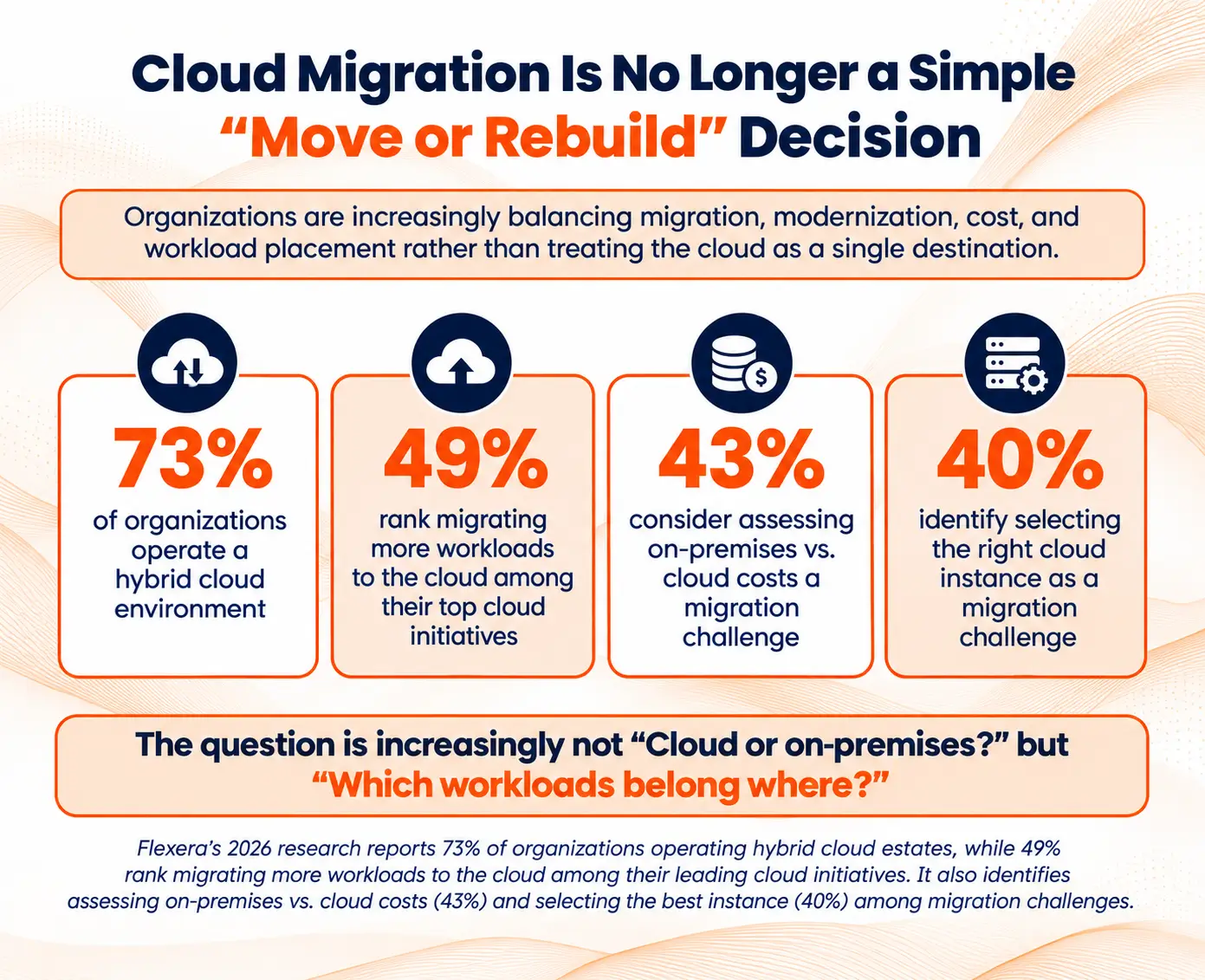
With a clear assessment in hand, the migration-versus-build decision follows more logically. The right choice is not a matter of preference. It follows from the specific conditions with which each organization is working.
When Migration Is the Right Move
Migration makes the most practical sense under the following conditions:
- The existing system works well and is generating value. The business logic in a working system represents years of decisions, edge cases, and refinements. Rebuilding that from scratch takes time, and during that rebuild, the business is still running on the old system. Migration preserves that accumulated value rather than discarding it.
- Regulatory continuity is a hard requirement. Some industries require audit trails and compliance documentation to carry continuously across system versions. A hard cutover to a new system can create gaps in that record that regulators will not accept.
- Timeline and budget do not allow for a full rebuild. In the short term, migration typically costs less than starting from scratch. When resources are constrained, this is a real factor, though a poorly-planned migration can easily cost more than a clean build once rework is factored in.
- The current technology stack is actively supported. When the existing frameworks and dependencies have ongoing vendor support, the technical risk of migration is manageable. The system is not fighting against its own foundation.
When Building Cloud-Native Makes More Sense
Starting fresh with cloud-native app development services is the more defensible choice when the conditions look like this:
- The codebase is beyond practical maintenance. When engineers spend more time working around the code than building on it—debugging undocumented behaviours, avoiding modules because touching them causes unexpected failures—the codebase is not an asset worth migrating. It is technical debt being carried forward into a new environment.
- The product is changing direction significantly. If the next version of the application will look and behave fundamentally differently from the current one, migration is essentially a full rewrite under a different name. Acknowledging that and building new is usually more efficient and produces a better result.
- Scalability is a core requirement from launch. For platforms where traffic patterns are unpredictable from day one—marketplace applications, consumer SaaS tools, or platforms in competitive categories—having architecture designed for scale from the beginning prevents a painful and expensive re-architecture later.
- Engineering velocity is a competitive priority. When the business needs to ship and iterate quickly, a clean cloud-native codebase without legacy constraints gives the product team considerably more room to move.
Typical Projects: SaaS, E-Commerce, Enterprise Platforms
The migration-versus-build decision has different weight depending on what the software is for. Here is how the logic plays out across the most common project types.
SaaS Products
SaaS products compete on the speed at which they release features and respond to customer feedback. A monolithic SaaS application can only release as fast as its slowest component allows because the entire system deploys together. That constraint compounds as the product grows and more teams contribute to the same codebase.
For a new SaaS product built from scratch, working with cloud application development services teams experienced in cloud-native architecture removes that constraint from the start. Individual services can be built, tested, and deployed independently. A team can operate with the release velocity of a much larger group, because they are not waiting on each other's work before they can ship.
For an existing SaaS platform dealing with aging infrastructure, migration typically happens incrementally. The highest-impact services like authentication, billing, or the core product API move first. The platform continues serving customers throughout. Once those services are stable on the cloud-native infrastructure, the migration continues across the rest of the system.
E-Commerce Platforms
E-commerce platforms tend to fail at the worst possible time. Things run fine on a regular Tuesday, but the moment a seasonal sale goes live, or a product launch drives a traffic surge, the system buckles. That is not a coincidence — peak traffic and peak revenue happen at the same time in e-commerce. So when the platform goes down during a flash sale, the business is not just dealing with a technical problem. It is watching revenue walk out the door in real time.
This is why many growing e-commerce businesses work with cloud-based application development companies experienced in event-driven, high-concurrency architectures. The goal is infrastructure that scales automatically when traffic spikes and scales back down when it normalizes—without the engineering team having to intervene manually.
For established platforms with years of product catalogue data, complex pricing rules, and deep supplier integrations, migration is typically the more realistic first step. Backend APIs move first—payment processing, inventory, and catalogue management—while the frontend and order management layer remain stable. This limits the blast radius of any issues that arise during the transition.
Enterprise Internal Platforms
Enterprise internal platforms present the most complicated cases in practice for a straightforward reason: they cannot be taken offline. These systems, like ERP platforms, HR tools, and internal approval workflows, are embedded deeply in daily operations. An extended outage does not just inconvenience employees; it stops work that cannot be paused.
The most practical approach for most enterprises is a combination strategy. Stable components that the business depends on move to the cloud. Components that are actively creating problems—slow performance, frequent failures, unsupported code—get rebuilt. This requires genuine prioritization and a clear-eyed view of which parts of the system are truly stable and which are simply not failing visibly yet.
For businesses in this position, partnering with cloud-native app development services teams that understand both legacy architecture and modern cloud infrastructure is critical. The ability to assess what is worth migrating versus what should be rebuilt does not come from cloud experience alone. It requires genuine familiarity with how legacy systems are structured and where their hidden dependencies typically sit.
Regulated Industries — Finance, Healthcare, Legal
In regulated industries, architecture decisions have compliance implications that sit entirely outside the normal technical trade-off conversation. A healthcare platform handling patient records cannot simply choose the most technically elegant architecture. It must choose one that satisfies data residency requirements, produces verifiable audit logs, and enforces access controls in ways regulators accept.
Building cloud-native has a clear advantage here: those requirements can be designed into the architecture from the beginning, rather than being added to a system not originally built to support them. Retrofitting compliance controls into a migrated legacy system is possible, but it is consistently more expensive and produces more brittle results.
Migration, however, remains the more common path in regulated industries when existing systems carry years of documented compliance history. That documentation is not easily reproduced, and in many cases it represents the fastest path to continued regulatory approval.
Cloud Application Cost vs. On-Premises Comparison
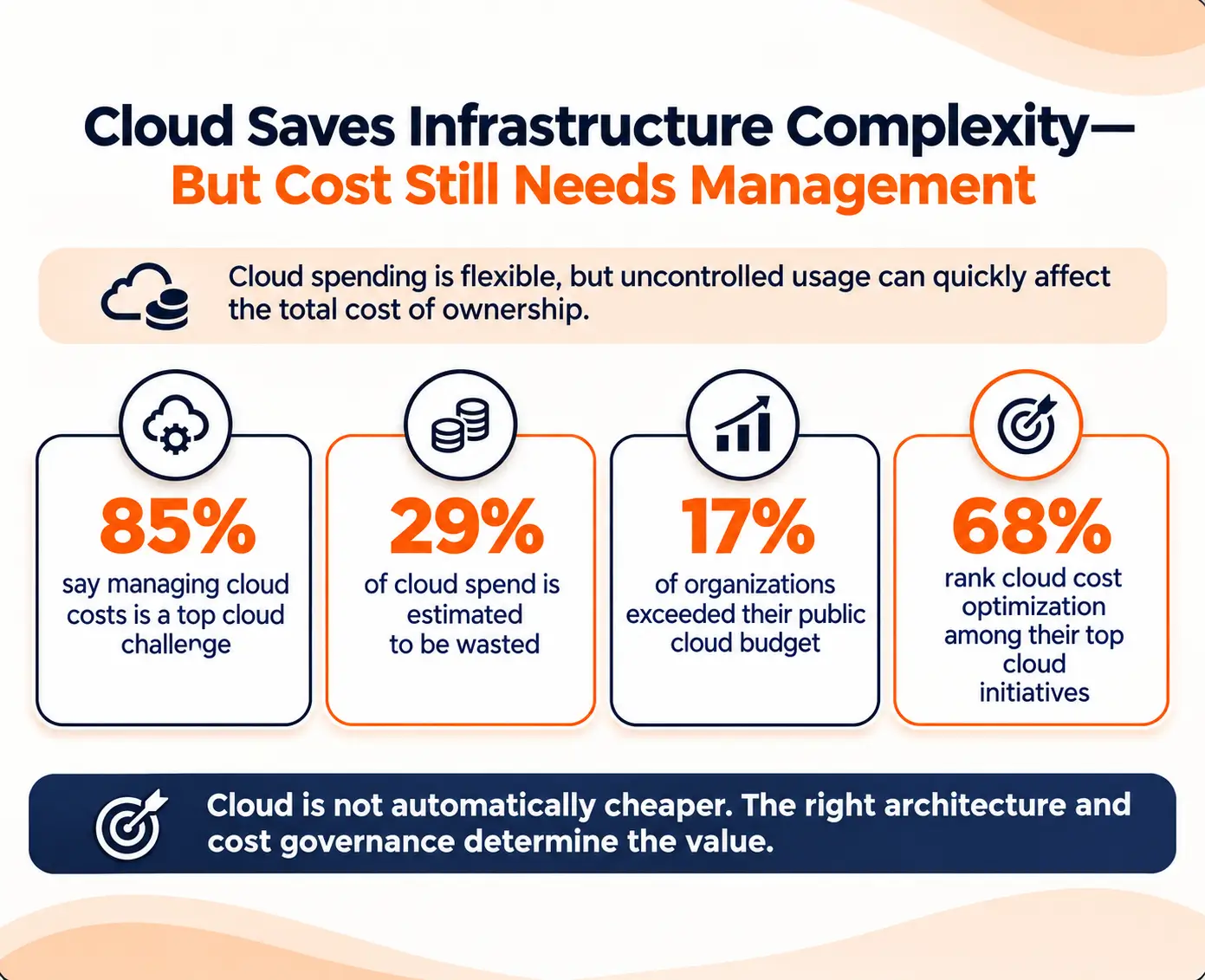
The server bill is usually the first number that comes up in this conversation, and it is rarely the right one to start with. On-premises infrastructure hides its costs across hardware cycles, facility management, and staffing that never land on the same invoice. Cloud infrastructure has the opposite problem — the costs are visible, but they grow fast when left alone. Neither one is the cheaper option by default. It really comes down to how a business operates, how predictable its workload is, and where it expects to be in a few years.
The Real Cost of On-Premises Infrastructure
On-premises infrastructure has a cost structure that is easy to underestimate. Many of the costs are indirect, deferred, or shared across departments, which makes them less visible during planning.
- Capital expenditure cycles: Servers, storage systems, and networking hardware require significant upfront capital. That hardware depreciates over time, and when it reaches end of life, the capital expenditure repeats. Businesses that do not model this refresh cycle correctly end up facing large, unexpected hardware costs at regular intervals.
- Operational overhead: Running physical infrastructure requires cooling, power, physical security, and facility management. These costs exist whether the servers are under heavy load or sitting largely idle. There is no mechanism to reduce them during quiet periods.
- Infrastructure staffing: On-premises environments require people who specialize in hardware management, networking, and server administration. These roles are distinct from software engineering roles, and qualified candidates have become progressively harder to find as the industry has shifted toward cloud-first infrastructure. When an organization loses someone with this knowledge, the gap is not easy to fill quickly.
- Disaster recovery costs: A resilient on-premises setup requires duplicating critical infrastructure in a secondary location. That secondary location carries its own hardware, power, cooling, and staffing costs. This effectively doubles portions of the infrastructure budget to achieve redundancy that cloud providers include as standard.
- Capacity planning risk: On-premises scaling requires buying hardware ahead of demand. Organizations either over-provision—paying for capacity they are not using—or under-provision, then scramble to procure hardware when demand arrives. Neither outcome is efficient, and both carry real costs.
Understanding Cloud Spending
Cloud infrastructure operates on an operational expenditure model, which changes how costs behave over time rather than eliminating them.
- Pay-for-use pricing: With cloud infrastructure, businesses pay for what they actually use. A slow week costs less than a busy one. When traffic picks up, the system handles it, and when things settle down, the costs come down too. For businesses that see demand go up and down through the year, this is a much better deal than paying a fixed cost for on-premises servers that sit unused for months at a time.
- No physical layer management: The cloud provider handles hardware procurement, replacement, and maintenance. Engineering teams focus on what runs on the infrastructure, not on the infrastructure itself. This shifts engineering time away from operations and toward product development.
- Faster provisioning: What takes weeks to provision on-premises takes hours in the cloud. This directly affects how quickly development teams can test ideas, stand up new environments, and respond to changing product requirements.
- Cost governance is not optional: Cloud spending has a way of creeping up when nobody is keeping an eye on it. One service gets over-provisioned, another runs longer than it should, and by the time the monthly bill arrives, the numbers are hard to explain. Businesses working with cloud application development services teams need to bring cost governance into the planning conversation early — not treat it as something to figure out after the damage is done.
Total Cost of Ownership Over Time
Over several years, the total spend on cloud and on-premises infrastructure often ends up closer than people expect. The difference is in how that money leaves the business. On-premises asks for a large capital investment upfront and then settles into predictable ongoing costs. Cloud spreads the spend across monthly operating expenses that move with actual usage.
For businesses with predictable, stable workloads and the scale to justify dedicated infrastructure, on-premises can produce lower long-term costs. For businesses with variable demand, global users, or the need to move quickly—which describes most growth-stage companies—cloud provides a more favourable total cost of ownership. Working with a cloud-based application development company that can model both scenarios with real numbers, rather than general assumptions, gives leadership the clearest basis for making this comparison honestly.
The choice between cloud-native development and migrating existing software always comes down to the specific business—its technology, its team, its growth trajectory, and its budget. Organizations with modular, working systems often find migration to be the smarter short-term move, while those dealing with unsustainable legacy platforms are generally better served building cloud native from scratch. Either way, the decision deserves a proper technical audit and a grounded business case, not assumptions or competitive pressure. The guidance of experienced cloud-native app development services professionals remains the most valuable input any organization can bring before the first line of code is written.
Frequently Asked Questions
Q1: What is the core difference between cloud-native development and migrating existing software to the cloud?
Cloud-native development means building an application from scratch using cloud-first principles, like microservices, containers, automated deployment, and horizontal scaling designed in from the start. Migration means moving an existing application into a cloud environment, with varying degrees of architectural change. A basic lift-and-shift preserves the existing architecture and relocates it. A refactor or re-architecture migration involves meaningful structural changes to how the system works. The right path depends on the existing application's health, how much organizational change can be absorbed, and what the application needs to accomplish over the next several years.
Q2: How can a business determine whether its existing system is ready for cloud migration?
Q3: Is cloud-native development always more expensive upfront than migrating?
Q4: Can businesses take a hybrid approach—migrating some components while rebuilding others from scratch?
Q5: Which types of businesses benefit most from cloud-native application development?
Request a
Free Quote Today!


